
Why I love Tig for visualizing my Git workflows: Why I love Tig for visualizing my Git workflows Sumantro Mukherjee Tue, 07/05/2022 – 03:00
If you find navigating your Git repositories frustratingly complex, have I got the tool for you. Meet Tig.
Tig is an ncurses-based text-mode interface for Git that allows you to browse changes in a Git repository. It also acts as a pager for the output of various Git commands. I use this tool to give me a good idea of what’s been changed in which commit by whom, the latest commit merged, and so much more. Try it for yourself, starting with this brief tutorial.
Installing Tig
On Linux, you can install Tig using your package manager. For instance, on Fedora and Mageia:
$ sudo dnf install tig
On Debian, Linux Mint, Elementary, Pop_OS, and other Debian-based distributions:
$ sud apt install tig
On macOS, use MacPorts or Homebrew. Tig’s complete installation guide can be found in the Tig Manual.
Using Tig
Tig provides an interactive view of common Git output. For instance, with Git you can view all refs with the command git show-ref:
 $   git show-ref
 98b108... refs/heads/master
 6dae95... refs/remotes/origin/1010-internal-share-partition-format-reflexion
 84e1f8... refs/remotes/origin/1015-add-libretro-openlara
 e62c7c... refs/remotes/origin/1016-add-support-for-retroarch-project-cd
 1c29a8... refs/remotes/origin/1066-add-libretro-mess
 ffd3f53... refs/remotes/origin/1155-automatically-generate-assets-for-external-installers
 ab4d14... refs/remotes/origin/1160-release-on-bare-metal-servers
 28baa9... refs/remotes/origin/1180-ipega-pg-9118
 8dff1d... refs/remotes/origin/1181-add-libretro-dosbox-core-s
 81a7fe... refs/remotes/origin/1189-allow-manual-build-on-master
 [...]
With Tig, you can get that information and much more in a scrollable list, plus keyboard shortcuts to open additional views with details about each ref.
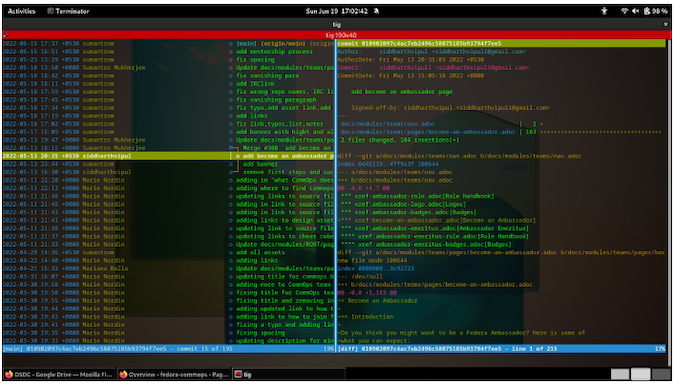
(Sumantro Mukherjee, CC BY-SA 4.0)
Pager mode
Tig enters pager mode when input is provided to stdin (standard input). When the show subcommand is specified and the --stdin option is given, stdin is assumed to be a list of commit IDs, which is forwarded to git-show:
$ git rev-list --author=sumantrom HEAD | tig show –stdin
Log and diff views
When you’re in Tig’s log view, you can press the d key on your keyboard to display diffs. This displays the files changed in the commit and the lines that were removed and added.
Interactive Git data
Tig is an excellent addition to Git. It makes it easy to review your Git repository by encouraging you to explore the logs without having to construct long and sometimes complex queries.
Add Tig to your Git toolkit today!
Tig is an excellent tool for reviewing your Git repository by encouraging you to explore the logs without having to construct long and sometimes complex queries.

opensource.com
 This work is licensed under a Creative Commons Attribution-Share Alike 4.0 International License.
: Opensource.com Sumantro Mukherjee
Supporting Open Source.
Have you tried: Visiting Port Elizabeth?