
What’s your favorite screenshot tool on Linux?: What’s your favorite screenshot tool on Linux? AmyJune Hineline Sat, 08/20/2022 – 03:00
As the saying goes, a picture is worth a thousand words, and while that’s not always the case with terminal commands and code, it still holds true for the graphical desktop. Screenshots capture precisely what’s on your screen. I love taking them to have a record of who attends meetings, so I don’t have to write it down at the moment. Or to capture a bug when doing UI testing. We all take them for different reasons, though, and there are more ways to take a screenshot than you might at first think.
I started thinking about screenshots after Jim Hall wrote an article listing GNOME screenshots, GIMP, and Firefox as the ways he often takes screenshots. And yet that’s just the beginning, as I quickly found out when I asked Opensource.com authors how they each take screenshots.
Making a spectacle
(Seth Kenlon, CC BY-SA 4.0)
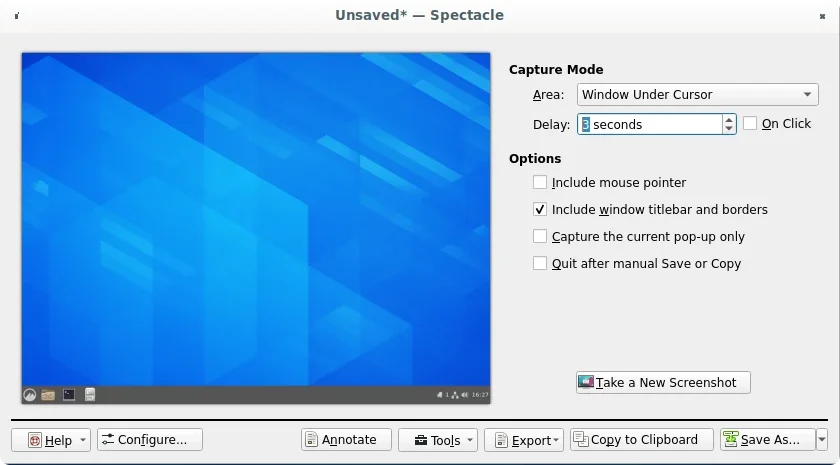
I use Spectacle. It works perfectly for my simple needs.
I use KDE. It ships with Spectacle, which seems to be responsible for taking a screenshot when I push the PrtScr (Print Screen) key.
A nice feature is that the default action is to take a screenshot immediately when you press PrtScr, but then it brings up the Spectacle interface, so you can take more sophisticated screenshots (a rectangular area, the window under your cursor, and so on.)
Framing the shot
For a long time I had wanted to capture only a small amount of the screen in a screenshot, not the whole thing, but struggled to know how.
Since then I’ve installed KolourPaint. I open the full screenshot inside the program, and cut out the part I want to keep. Hope this could help others suffering the same screenshot dilemma!
I use Shift+PrtSc to capture a small amount of the screen in a screenshot.
Emacs
A while back I created an Elisp function to take a screenshot from Emacs.
Flameshot
(Seth Kenlon, CC BY-SA 4.0)
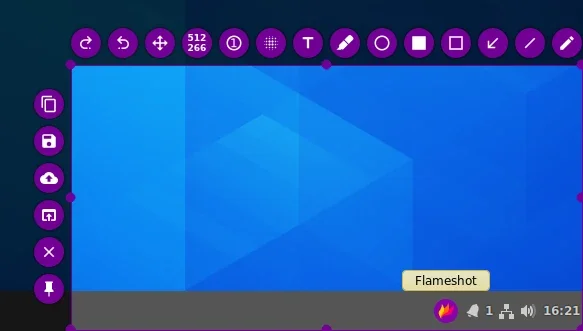
Flameshot, the one and only! Nothing is missing in this wonderful tool: doodling, arrows, adding text, a pixelate tool for blurring out sensitive information, an autoincrementing counter bubble, save, copy, the ability to open the screenshot in a selected application, and the list goes on and on. Once I installed it, I’ve never looked for anything else!
A friendly hint: when installing from Flatpak, you might want to use Flatseal to grant access to your home folder, otherwise the Save dialog will feel somewhat empty.
ImageMagick
 #!/bin/bash
 current=$  (date +%H-%M-%S-%d-%m-%Y).png
 if [[ -z "$  {1}" ]]; then
    import -window root "$  {HOME}/$  {current}" # All screen
 else
    import "$  {HOME}/$  {current}" # Custom screenshot
 fi

 notify-send "Screenshot $  {current} taken successfully!"
—Suporte Terminal Root
GNOME
(Seth Kenlon, CC BY-SA 4.0)
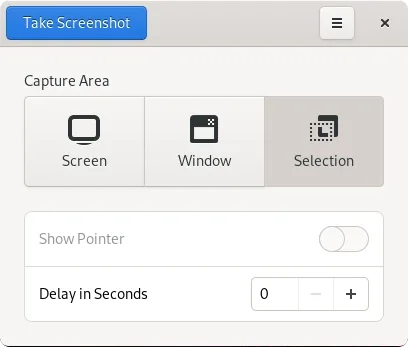
As a mostly GNOME Desktop user, I was happy taking screenshots with the regular PrtSc, Ctrl+PrtSc, or Shift+PrtSc keys. My favorite is Shift because it allows me to select an area of the screen.
Recently, GNOME recently introduced an improved screenshot tool when you simply hit PrtSc. I haven’t even used it that much yet, so I’m looking forward to trying it out thoroughly on some future articles.
As a satisfied GNOME user, I’ve been using the built-in screenshot tool. With the older version, I would screenshot a window with Shift+PrtSc. Now I just use PrtSc and select the region with the tool. I like the new one better, but if I had to go back to the old, that’d be OK too.
XFCE Screenshooter
(Seth Kenlon, CC BY-SA 4.0)
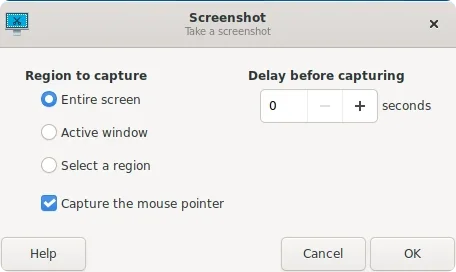
I’ve been using XFCE lately, and xfce4-screenshooter has been doing an excellent job. Like the rest of XFCE, it’s minimal but highly functional, with options to capture the entire screen, the active window, or just a region. You can even activate or deactivate whether the mouse cursor is included in the shot.
Grim and Slurp
I have a fun little alias that I use for screenshots:
alias sshot='; grim -g "$ (slurp)" screenshot-$ (date +%s).png 2> /dev/null'
It lets me draw a rectangle on my screen, and it captures just that area. The command uses grim and slurp, both available in the Fedora repos.
But this only works on Wayland. On X11, you can replace them with maim and scrot.
Your screenshot tool
What’s your screenshot tool of choice? Tell us in the comments!
There are many open source screenshot tools to choose from, but which one works for you?

 This work is licensed under a Creative Commons Attribution-Share Alike 4.0 International License.
: Opensource.com AmyJune Hineline
Supporting Open Source.
Have you tried: Visiting Port Elizabeth?