
Tour Collabora Online, an open source alternative to Google Workspace: Tour Collabora Online, an open source alternative to Google Workspace Heike Jurzik Mon, 07/25/2022 – 03:00
Setting up your own cloud office is an important step towards digital sovereignty. Collabora Online is an open source office suite for the cloud or on-premises that protects users’ privacy and allows them to keep full control of their data. The software is developed by Collabora Ltd, Cambridge, UK, and their team working around the world. Collabora Online is based on LibreOffice Technology and is primarily licensed under the Mozilla Public License 2.0.
There are two editions available from the supplier:
- The production-ready and stable version Collabora Online (COOL)
- The Collabora Online Development Edition (CODE), aimed at developers, home users, and small teams
Collabora Online is an open source alternative to Microsoft 365 or Google Workspace. The LibreOffice-based online office suite supports all major document, spreadsheet, and presentation file formats and collaborative editing.
Get started with Collabora Online
Before I look at some of Collabora Online’s features, I’ll just clarify: Collabora Online is not stand-alone software. Instead, the online office suite integrates into an existing infrastructure and requires a cloud solution as a foundation, such as EGroupware, Nextcloud, ownCloud, or Pydio. The Collabora website also lists Alfresco, Microsoft SharePoint 2016 Server, Nuxeo, or Moodle as integration options.
Alternatively, there is a supported appliance for Collabora Online built on Univention Corporate Server (UCS), a Debian-based enterprise Linux distribution with an integrated identity and infrastructure management system. The Univention App Center offers two appliances, one with Nextcloud and one with ownCloud as the base.
If you don’t want to install Collabora Online yourself, there is a list of partners—including hosting partners—who offer Collabora Online as a SaaS solution.
Standard file formats
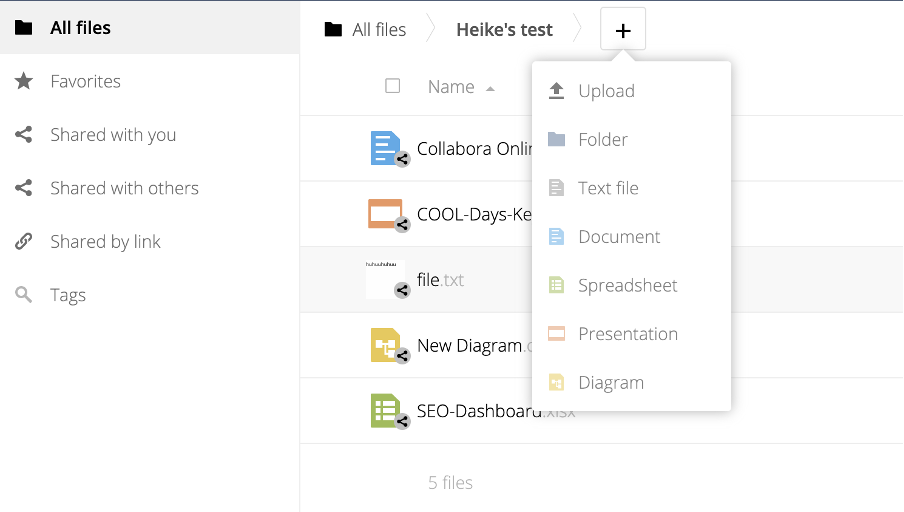
Collabora Online works in any modern web browser; no plug-ins or add-ons are necessary. The cloud office includes a word processor (Writer), a spreadsheet (Calc), and presentation software (Impress). The icing on the cake is an application for creating vector graphics (Draw)—neither Google nor Microsoft offer a dedicated drawing program.
(Heike Jurzik, CC BY-SA 4.0)
Apart from the Open Document Format (ODT, ODS, ODP, etc.), Collabora Online can open and process various Microsoft Office formats (DOC/DOCX, XLS/XLSX, PPT/PPTX). Basically, the cloud office supports the same file formats as LibreOffice, including older standards and exotics. Exchanging documents with other users works well, provided everyone knows how to work with style sheets and the difference between tabs and spaces. This knowledge applies to importing and exporting files between different office suites—online or offline—as well.
Look and feel of Collabora Online
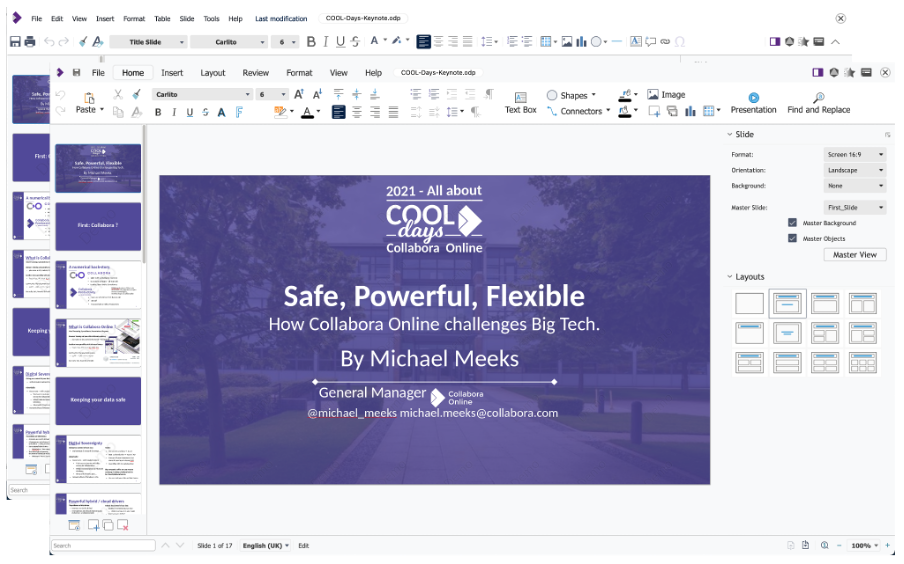
Starting with version 6.4, Collabora Online offers the Tabbed view as an alternative user interface to the classic Compact view. It’s not only designed to provide easy access to all features but also helps Microsoft Office users get used to the interface.
In current Collabora versions, users can choose their preferred look and feel via the View menu. In previous versions, the administrator had to adjust the server-side settings by editing the file loolwsd.xml (after version 21.11, this was called coolwsd.xml), section user_interface.
Please note that changing the XML file affects the look and feel for all users. EGroupware offers to modify the toolbar individually. Users choose their preferred interface in the personal settings, section File manager, tab Collabora Online. Here they can select Standard Toolbar from the drop-down menu and click Apply.
(Heike Jurzik, CC BY-SA 4.0)
Collabora Online vs Microsoft 365 vs Google Workspace
Here are some key collaboration features to see how Collabora Online performs compared to Microsoft 365 and Google Workspace:
(Heike Jurzik, CC BY-SA 4.0)
(Heike Jurzik, CC BY-SA 4.0)
- Version history: This depends on the integration, i.e., the underlying host system. Most platforms list existing versions with timestamps. For example, in EGroupware, you must open a document and select File/See history. Nextcloud and ownCloud offer a version history via the integrated file manager (click on the dots and select Details).
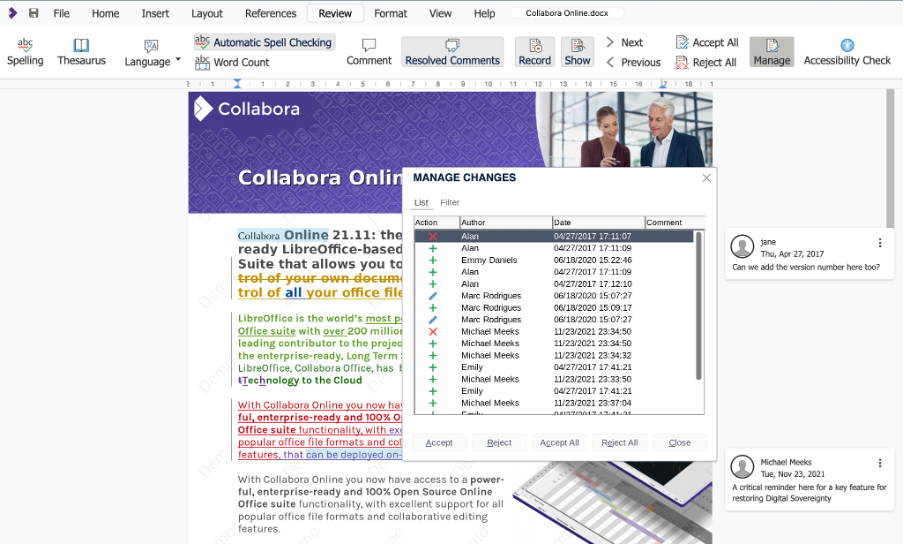
- Manage changes: The menu Review not only contains a spellchecker and a thesaurus, but it also offers functions for commenting, recording, and managing changes. Users are given different colors when editing documents collaboratively, and the changes appear in near real-time. Added text appears highlighted and underlined, and deleted text is highlighted and crossed through.
- Comments: Marking words, lines, and entire sections, leaving and replying to comments, marking threads as resolved and unresolved—it all works like a charm.
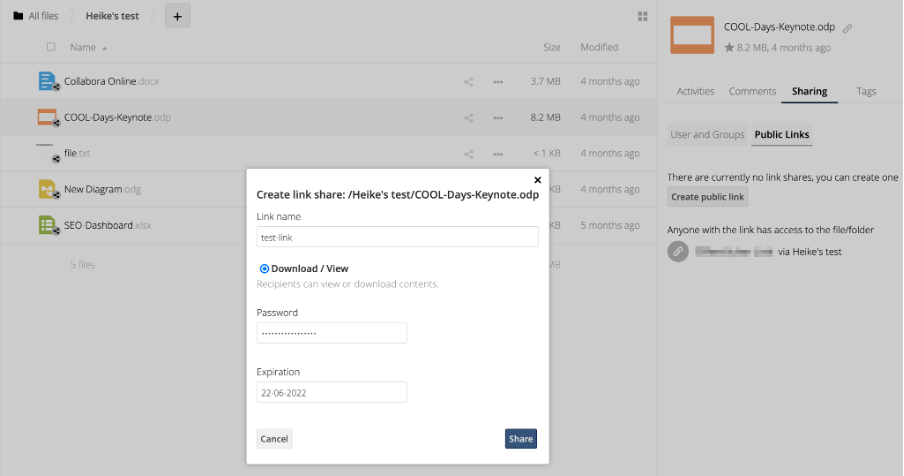
- Shares: Sharing documents with other users (internally and externally) is straightforward. In integrations like Nextcloud and ownCloud, this all happens via the file manager and the sharing icon. The Sharing tab shows existing shares, offers to create public links, and sets up passwords and expiration dates. In EGroupware, you must right-click a document in the file manager and select the Share/Writable Collabora Online link. Alternatively, you can use the shared folders feature on all platforms to grant internal access to your documents.
Mobile access to your office suite
Mobile apps available for Android and iOS allow you to edit documents on your smartphone or tablet and even work offline. While all basic functions work fine, there is still room for improvement in formatting documents.
In any case, it’s more convenient to work in the web browser of mobile devices. Thanks to the responsive layouts of the underlying platforms, this works well. Even collaborative and simultaneous editing of documents in Collabora Online runs smoothly. Admittedly, reading long documents is not much fun on a small display, and typing longer texts on the keyboard of a smartphone or tablet is not ideal either—but it works.
Control your office suite the open source way
There are no major differences between the cloud offices of the big players—at least for end users. All basic functions work fine, and there are no complaints about importing and exporting documents and dealing with different office formats. The biggest challenge might be installing and setting up the cloud office on a dedicated server with another cloud solution as a foundation. Regardless of your integration, you must take care of the installation and maintenance yourself.
Admittedly, this requires a little more effort than setting up an account with Google or Microsoft, but the data is stored on your own server or in a private cloud if you opt for a SaaS solution. Anyone who values digital sovereignty and wants to retain complete control of their data should consider it. Check out the online demo if you want to give Collabora Online a try.
Collabora Online is an open source office suite for the cloud or on-premises that protects users’ privacy and allows them to keep full control of their data.
Opensource.com
 This work is licensed under a Creative Commons Attribution-Share Alike 4.0 International License.
: Opensource.com Heike Jurzik
Supporting Open Source.
Have you tried: Farking?