|
| Image: Adobe |
Adobe has announced its latest round of updates, with new features coming to Lightroom and Adobe Camera Raw. Unsurprisingly, many of the new tools utilize AI in some capacity. While most of the changes aim to make editing faster and better, there is also a useful update for tethered shooters.
 |
|
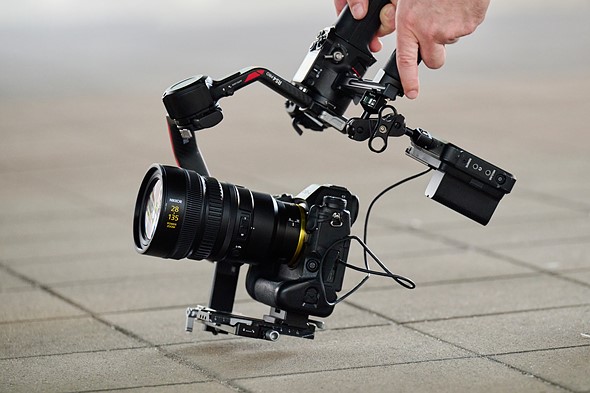
Shooting tethered with Lightroom Classic will now allow users to select focus mode and focus points. Image: Adobe |
Lightroom Classic will now offer a Focus Point Selection tool, allowing users to change the camera’s autofocus mode and focus point in the Tether Live View window. With this enabled, you can easily change your autofocus mode and simply click on the subject you want in focus. That’s an ideal feature when the camera is in locations that make it challenging to access, such as in tight corners or high above your head. Plus, setting the focus point on a larger display is always easier than working with a small camera display. Focus Point Selection will work with supported Sony, Nikon and Canon cameras.
 |
| Image: Adobe |
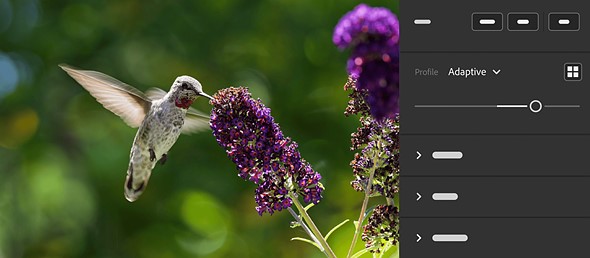
One of the most prominent updates regarding editing is the expansion of Camera Raw’s Adaptive Profile. Adobe released Adaptive Profile for Camera Raw last fall to make editing images with high dynamic range easier, regardless of whether you plan on exporting them in SDR or HDR. The Adaptive Profile uses an AI model to analyze your photo and adjust tones and colors. These adjustments are made according to each individual image instead of simply applying universal settings like other presets and profiles.
Recent Videos
Adaptive Profile builds on Adobe’s existing HDR workflows, taking things to the next level. The profile can make a significant difference, breathing new life into images. It is certainly exciting to see this feature moving to Lightroom as well.
 |
| To use Distraction Removal in Camera Raw, you’ll need to turn on Technology Previews in the Camera Raw settings menu. |
Another tool that Adobe is expanding is the Distraction Removal tool. Adobe previously released Distraction Removal in Photoshop in October last year, with the option to use AI to automatically detect people, wires and cables, making it easy to remove them with one or two clicks. Now, the option to remove unwanted people will also be moving into Camera Raw as a Tech Preview. Adobe says it will also be coming soon to Lightroom but didn’t specify a date.
 |
|
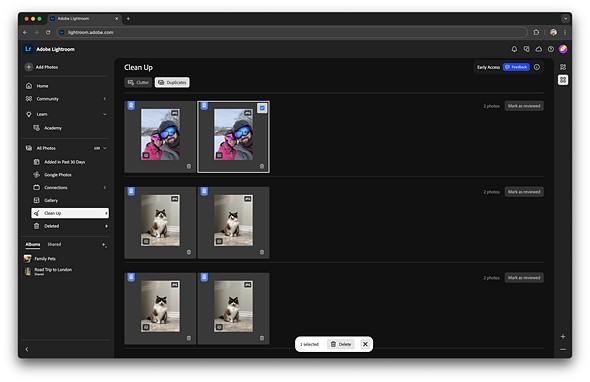
Lightroom on the web can now flag duplicates to streamline the culling process. Image: Adobe |
Lightroom on the web isn’t left out from the updates, either, with a change coming that aims to make it easier to work with large libraries. Culling through thousands of photos is one of the more time-consuming processes when selecting images to edit, so tools to help with that are always appreciated. To aid in that process, Adobe has added a Find Duplicates feature that is now available in early access. It is part of the Clean Up tool in Lightroom on the web and can identify duplicate shots, saving you the time of going through them. Clean Up can also flag blurry images, screenshots and other “unwanted images.”
Finally, along with some smaller updates to provide easier link sharing, improved performance in Lightroom Classic and better Select Background performance on Lightroom for Mobile, Adobe also announced dual monitor support for Lightroom. Working with dual monitors can be a game changer for efficiency, so this is a welcome addition.

Our DPREVIEW Tribute:
After nearly 25 years of operation, DPReview closed on 10 April 2023. This difficult decision was part of the annual operating plan review that parent company, Amazon, shared earlier this year.
Over the course of 25 years, DP Review built up a reputation as being one of the most informative places to go for information about that new camera or lens you’re after. DP Review began as an independent reviews site based in the UK in 1998, the brainchild of Philip and Joanna Askey, but it was eventually purchased by Amazon in 2007 and relocated over to Seattle in the USA in 2010.
Cheers DPReview – thanks for the great work and content that guided photographers, videographers and techno junkies the world over!