
How to use the open source MQTT plug-in in JMeter: How to use the open source MQTT plug-in in JMeter chongyuanyin Mon, 01/16/2023 – 03:00
In a previous article, I described how JMeter has built-in support for HTTP, HTTPS, TCP, and other common protocols and has a plug-in extension mechanism.
Through plug-ins, you can support much more than just what’s built-in, including MQTT.
MQTT is a mainstream protocol in the IoT world. Although it is not a protocol type that comes with JMeter, it is extremely common in IoT testing scenarios. In order to support the load testing of the MQTT protocol, EMQ developed a JMeter-based open source testing plug-in for the MQTT protocol.
This article introduces how to use the MQTT plug-in in JMeter.
Install the MQTT plug-in on JMeter
The installation of the MQTT plug-in is similar to other JMeter third-party plug-ins:
- Download the latest version of the plug-in
mqtt-xmeter-2.0.2-jar-with-dependencies.jarfrom GitHub. The plug-in supports JMeter 3.2 and above. - Copy the plug-in jar package to the plug-in directory of JMeter:
$ JMETER_HOME/lib/ext. - Restart JMeter.
At the time of writing, the JMeter MQTT plug-in supports a variety of samplers, such as connection, message publish, and message subscription.
These can be combined to build more complex test scenarios.
MQTT connect sampler
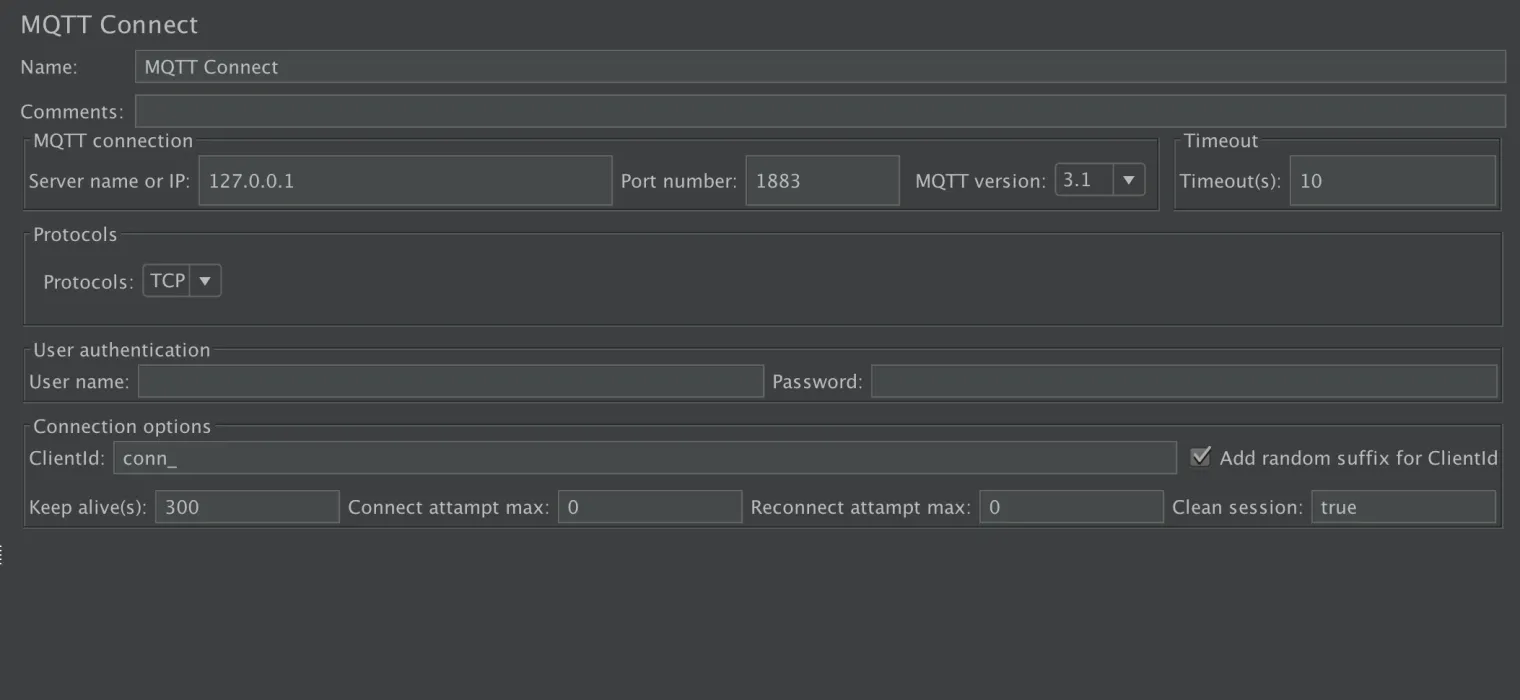
The Connect Sampler simulates an IoT device and initiates an MQTT connection.
(Chongyuan Yin, CC BY-SA 4.0)
Server name or IP: The address of the MQTT server being tested.
Port number: Taking the EMQX Broker as an example, the default ports are 1883 for TCP connections and 8883 for SSL connections. Please refer to the specific configuration of the server for the specific port.
MQTT version: Presently supports MQTT 3.1 and 3.1.1 versions.
Timeout: Connection timeout setting, in seconds.
Protocols: Supports TCP, SSL, WS, and WSS connections to MQTT servers. When selecting an SSL or WSS encrypted channel connection, a one-way or two-way authentication (Dual) can be selected. If two-way authentication is required, specify the appropriate client certificate (p12 certificate) and the corresponding file protection password (Secret).
User authentication: If the MQTT server is configured for user authentication, provide the corresponding Username and Password.
ClientId: The identity of the virtual user. If Add random suffix for ClientId is enabled, a UUID string is added as a suffix to each ClientId and the whole virtual user identifier.
Keep alive: The interval for sending heartbeat signals. For example, 300 means that the client sends ping requests to the server every 300 seconds to keep the connection active.
Connect attempt max: The maximum number of reconnection attempts during the first connection. If this number is exceeded, the connection is considered failed. If the user wants to keep trying to reconnect, set this to -1.
Reconnect attempt max: The maximum number of reconnect attempts during subsequent connections. If this number is exceeded, the connection is considered failed. If the user wants to keep trying to reconnect, set this to -1.
Clean session: Set this option to false when the user wants to keep the session state between connections or true when the user does not want to keep the session state in new connections.
MQTT message publish sampler (MQTT Pub Sampler)
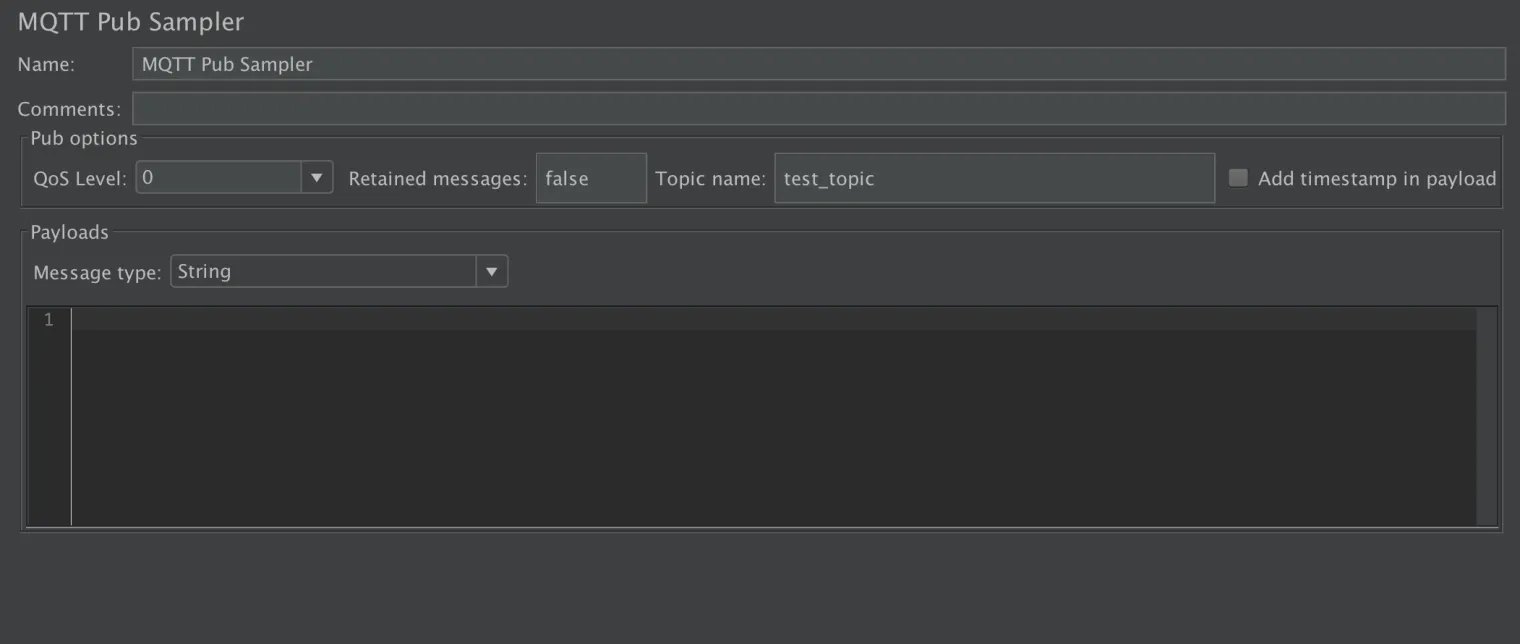
The message publish sampler reuses the MQTT connection established in the Connection Sampler to publish messages to the target MQTT server.
(Chongyuan Yin, CC BY-SA 4.0)
QoS Level: Quality of Service, with values 0, 1, and 2, representing AT_MOST_ONCE, AT_LEAST_ONCE, and EXACTLY_ONCE, respectively, in the MQTT protocol specification.
Retained messages: If you want to use retained messages, set this option to true to have the MQTT server store the retained messages published by the plug-in using the given QoS. When the subscription occurs on the corresponding topic, the last retained message is delivered directly to the subscriber. Therefore, the subscriber does not have to wait to get the latest status value of the publisher.
Topic name: The topic of the published message.
Add timestamp in payload: If enabled, the current timestamp is attached to the beginning of the published message body. Together with the Payload includes timestamp option of the message subscription sampler, this can calculate the delay time reached by the message at the message receiving end. If disabled, only the actual message body is sent.
Payloads and Message type: Three message types are presently supported:
- String: Ordinary string.
- Hex String: A string is presented as a hexadecimal value, such as Hello, which can be represented as 48656C6C6F (where 48 corresponds to the letter H in the ASCII table, and so on). Typically, hexadecimal strings are used to construct non-textual message bodies, such as describing certain private protocol interactions, control information, and so on.
- Random string with a fixed length: A random string of a specified length (in bytes) is generated as a message body.
MQTT message subscription sampler (MQTT Sub Sampler)
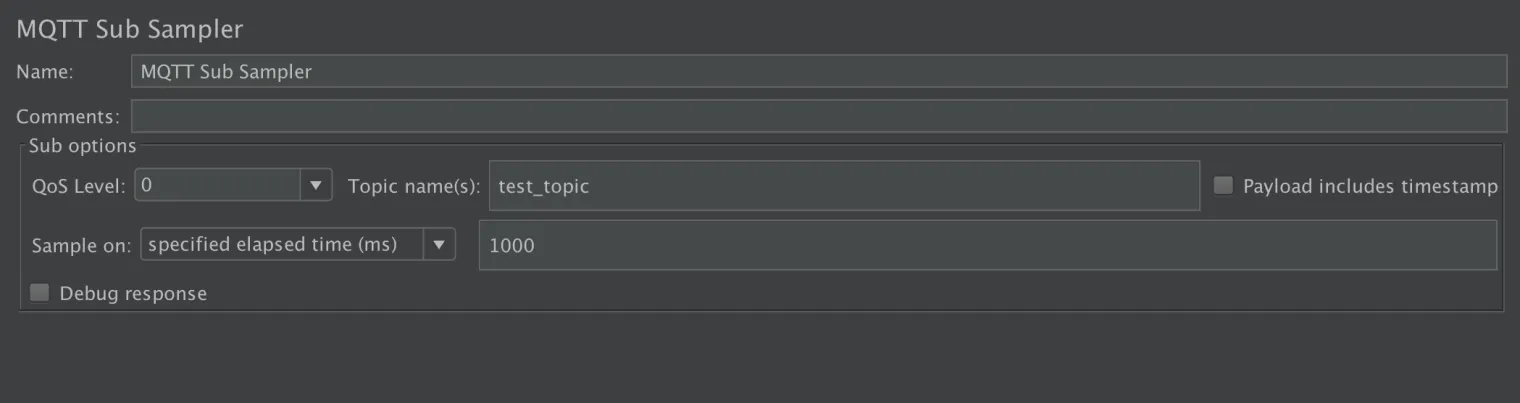
The Message Pub Sampler reuses the MQTT connection established in the Connection Sampler to subscribe to messages from the target MQTT server.
(Chongyuan Yin, CC BY-SA 4.0)
QoS Level: Quality of Service, the meaning is the same as that for the Message Pub Sampler.
Topic name: The topic to which the subscribed message belongs. A single message subscription sampler can subscribe to multiple topics, separated by commas.
Payload includes timestamp: If enabled, the timestamp is parsed from the beginning of the message body, which can be used to calculate the receive delay of the message with the Add timestamp in the payload option of the message delivery sampler. If disabled, only the actual message body is parsed.
Sample on: For the sampling method, the default is specified elapsed time (ms), such as sampling every millisecond. The number of received messages can also be selected, such as sampling once for every specified number of messages received.
Debug response: If checked, the message content is printed in the JMeter response. This option is mainly used for debugging purposes. It isn’t recommended to run the test formally when checked in order to avoid affecting the test efficiency.
MQTT disconnect sampler (MQTT DisConnect)
Disconnects the MQTT connection established in the connection sampler.

(Chongyuan Yin, CC BY-SA 4.0)
For flexibility, the property values in the above sampler can refer to JMeter’s system or custom variables.
MQTT and JMeter
In this article, I’ve introduced the various test components of the JMeter MQTT plug-in. In another article, I’ll discuss in detail how to build test scripts with the MQTT plug-in for different test scenarios.
This article originally appeared on How to Use the MQTT Plug-in in JMeter and is republished with permission.
In order to support the load testing of the MQTT protocol, EMQ developed a JMeter-based open source testing plug-in for the MQTT protocol.

Opensource.com
 This work is licensed under a Creative Commons Attribution-Share Alike 4.0 International License.
: Opensource.com chongyuanyin
Supporting Open Source.
Have you tried: Diving with Sharks?