
How to display the presence and absence of nth-highest group-wise values in SQL: How to display the presence and absence of nth-highest group-wise values in SQL Mohammed Kamil Khan Fri, 09/02/2022 – 03:00
While skimming through SQL to prepare for interviews, I often come across this question: Find the employee with the highest or (second-highest) salary by joining a table containing employee information with another that contains department information. This raises a further question: What about finding the employee who earns the nth-highest salary department-wide?
Now I want to pose a more complex scenario: What will happen when a department doesn’t have an employee earning the nth-highest salary? For example, a department with only two employees will not have an employee earning the third-highest salary.
Here’s my approach to this question:
Create department and employee tables
I create a table that includes fields such as dept_id and dept_name.
 CREATE TABLE department (
     dept_id INT,
     dept_name VARCHAR(60)
 );
Now I insert various departments into the new table.
 INSERT INTO department (dept_id,dept_name)
 VALUES (780,'HR');
 INSERT INTO department (dept_id,dept_name)
 VALUES (781,'Marketing');
 INSERT INTO department (dept_id,dept_name)
 VALUES (782,'Sales');
 INSERT INTO department (dept_id,dept_name)
 VALUES (783,'Web Dev');
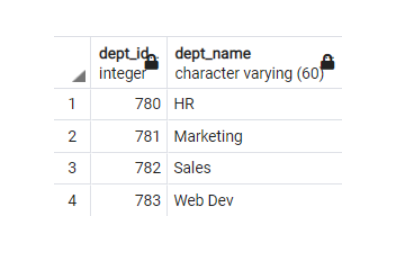
Figure 1. The department table (Mohammed Kamil Khan, CC BY-SA 4.0)
Next, I create another table incorporating the fields first_name, last_name, dept_id, and salary.
 CREATE TABLE employee (
     first_name VARCHAR(100),
     last_name VARCHAR(100),
     dept_id INT,
     salary INT
 );
Then I insert values into the table:
 INSERT INTO employee (first_name,last_name,dept_id,salary)
 VALUES ('Sam','Burton',781,80000);
 INSERT INTO employee (first_name,last_name,dept_id,salary)
 VALUES ('Peter','Mellark',780,90000);
 INSERT INTO employee (first_name,last_name,dept_id,salary)
 VALUES ('Happy','Hogan',782,110000);
 INSERT INTO employee (first_name,last_name,dept_id,salary)
 VALUES ('Steve','Palmer',782,120000);
 INSERT INTO employee (first_name,last_name,dept_id,salary)
 VALUES ('Christopher','Walker',783,140000);
 INSERT INTO employee (first_name,last_name,dept_id,salary)
 VALUES ('Richard','Freeman',781,85000);
 INSERT INTO employee (first_name,last_name,dept_id,salary)
 VALUES ('Alex','Wilson',782,115000);
 INSERT INTO employee (first_name,last_name,dept_id,salary)
 VALUES ('Harry','Simmons',781,90000);
 INSERT INTO employee (first_name,last_name,dept_id,salary)
 VALUES ('Thomas','Henderson',780,95000);
 INSERT INTO employee (first_name,last_name,dept_id,salary)
 VALUES ('Ronald','Thompson',783,130000);
 INSERT INTO employee (first_name,last_name,dept_id,salary)
 VALUES ('James','Martin',783,135000);
 INSERT INTO employee (first_name,last_name,dept_id,salary)
 VALUES ('Laurent','Fisher',780,100000);
 INSERT INTO employee (first_name,last_name,dept_id,salary)
 VALUES ('Tom','Brooks',780,85000);
 INSERT INTO employee (first_name,last_name,dept_id,salary)
 VALUES ('Tom','Bennington',783,140000);
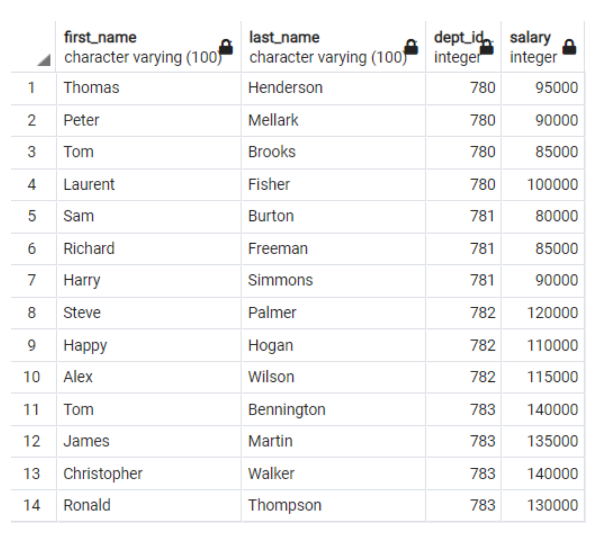
Figure 2. A table of employees ordered by department ID (Mohammed Kamil Khan, CC BY-SA 4.0)
I can infer the number of employees in each department using this table (department ID:number of employees):
- 780:4
- 781:3
- 782:3
- 783:4
If I want the view the second-highest-earning employees from different departments, along with their department’s name (using DENSE_RANK), the table will be as follows:
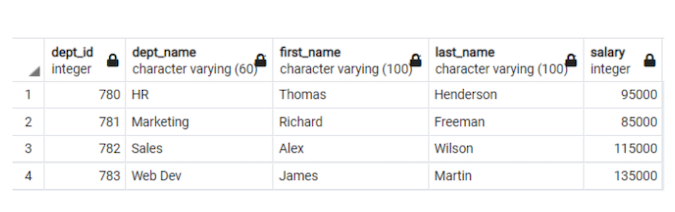
Figure 3. The second-highest-earning employee in each department (Mohammed Kamil Khan, CC BY-SA 4.0)
If I apply the same query to find the fourth-highest-earning employees, the output will be only Tom Brooks of department 780 (HR), with a salary of $ 85,000.

Figure 4. The fourth-highest-earning employee (Mohammed Kamil Khan, CC BY-SA 4.0)
Though department 783 (Web Dev) has four employees, two (James Martin and Ronald Thompson) will be classified as the third-highest-earning employees of that department, since the top two earners have the same salary.
Finding the nth highest
Now, to the main question: What if I want to display the dept_ID and dept_name with null values for employee-related fields for departments that do not have an nth-highest-earning employee?
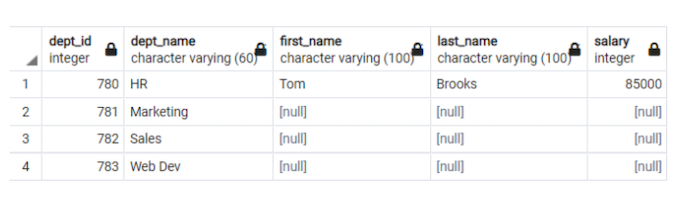
Figure 5. All departments listed, whether or not they have an nth-highest-earning employee (Mohammed Kamil Khan, CC BY-SA 4.0)
The table displayed in Figure 5 is what I am aiming to obtain when specific departments do not have an nth-highest-earning employee: The marketing, sales, and web dev departments are listed, but the name and salary fields contain a null value.
The ultimate query that helps obtain the table in Figure 5 is as follows:
 SELECT * FROM (WITH null1 AS (SELECT A.dept_id, A.dept_name, A.first_name, A.last_name, A.salary
 FROM (SELECT * FROM (
 SELECT department.dept_id, department.dept_name, employee.first_name, employee.last_name,
 employee.salary, DENSE_RANK() OVER (PARTITION BY employee.dept_id ORDER BY employee.salary DESC) AS Rank1
 FROM employee INNER JOIN department
 ON employee.dept_id=department.dept_id) AS k
 WHERE rank1=4)A),
 full1 AS (SELECT dept_id, dept_name FROM department WHERE dept_id NOT IN (SELECT dept_id FROM null1 WHERE dept_id IS NOT NULL)),
 nulled AS(SELECT
 CASE WHEN null1.dept_id IS NULL THEN full1.dept_id ELSE null1.dept_id END,
 CASE WHEN null1.dept_name IS NULL THEN full1.dept_name ELSE null1.dept_name END,
 first_name,last_name,salary
 FROM null1 RIGHT JOIN full1 ON null1.dept_id=full1.dept_id)
 SELECT * FROM null1
 UNION
 SELECT * FROM nulled
 ORDER BY dept_id)
 B;
Breakdown of the query
I will break down the query to make it less overwhelming.
Use DENSE_RANK() to display employee and department information (not involving null for the absence of the nth-highest-earning member):
 SELECT * FROM (
   SELECT department.dept_id, department.dept_name, employee.first_name, employee.last_name,
    employee.salary, DENSE_RANK() OVER (PARTITION BY employee.dept_id ORDER BY employee.salary DESC) AS Rank1
    FROM employee INNER JOIN department
    ON employee.dept_id=department.dept_id) AS k
    WHERE rank1=4
Output:

Figure 6. The fourth-highest earner (Mohammed Kamil Khan, CC BY-SA 4.0)
Exclude the rank1 column from the table in Figure 6, which identifies only one employee with a fourth-highest salary, even though there are four employees in another department.
 SELECT A.dept_id, A.dept_name, A.first_name, A.last_name, A.salary
     FROM (SELECT * FROM (
   SELECT department.dept_id, department.dept_name, employee.first_name, employee.last_name,
    employee.salary, DENSE_RANK() OVER (PARTITION BY employee.dept_id ORDER BY employee.salary DESC) AS Rank1
    FROM employee INNER JOIN department
    ON employee.dept_id=department.dept_id) AS k
    WHERE rank1=4)A
Output:

Figure 7. The fourth-highest earner table without the rank 1 column (Mohammed Kamil Khan, CC BY-SA 4.0)
Point out the departments from the department table that do not have an nth-highest-earning employee:
 SELECT * FROM (WITH null1 AS (SELECT A.dept_id, A.dept_name, A.first_name, A.last_name, A.salary
     FROM (SELECT * FROM (
   SELECT department.dept_id, department.dept_name, employee.first_name, employee.last_name,
    employee.salary, DENSE_RANK() OVER (PARTITION BY employee.dept_id ORDER BY employee.salary DESC) AS Rank1
    FROM employee INNER JOIN department
    ON employee.dept_id=department.dept_id) AS k
    WHERE rank1=4)A),
 full1 AS (SELECT dept_id, dept_name FROM department WHERE dept_id NOT IN (SELECT dept_id FROM null1 WHERE dept_id IS NOT NULL))
 SELECT * FROM full1)B
Output:
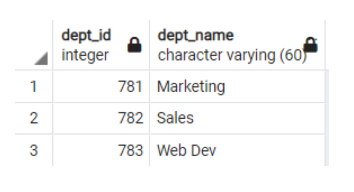
Figure 8. The full1 table listing the departments without a fourth-highest earner (Mohammed Kamil Khan, CC BY-SA 4.0)
Replace full1 in the last line of the above code with null1:
 SELECT * FROM (WITH null1 AS (SELECT A.dept_id, A.dept_name, A.first_name, A.last_name, A.salary
     FROM (SELECT * FROM (
   SELECT department.dept_id, department.dept_name, employee.first_name, employee.last_name,
    employee.salary, DENSE_RANK() OVER (PARTITION BY employee.dept_id ORDER BY employee.salary DESC) AS Rank1
    FROM employee INNER JOIN department
    ON employee.dept_id=department.dept_id) AS k
    WHERE rank1=4)A),
 full1 AS (SELECT dept_id, dept_name FROM department WHERE dept_id NOT IN (SELECT dept_id FROM null1 WHERE dept_id IS NOT NULL))
 SELECT * FROM null1)B
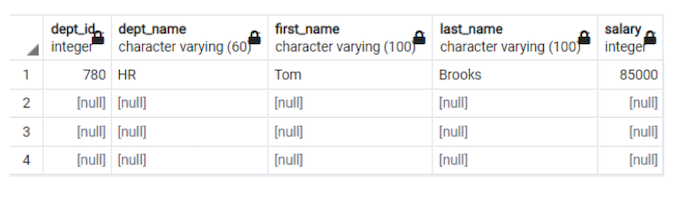
Figure 9. The null1 table listing all departments, with null values for those without a fourth-highest earner (Mohammed Kamil Khan, CC BY-SA 4.0)
Now, I fill the null values of the dept_id and dept_name fields in Figure 9 with the corresponding values from Figure 8.
 SELECT * FROM (WITH null1 AS (SELECT A.dept_id, A.dept_name, A.first_name, A.last_name, A.salary
     FROM (SELECT * FROM (
   SELECT department.dept_id, department.dept_name, employee.first_name, employee.last_name,
    employee.salary, DENSE_RANK() OVER (PARTITION BY employee.dept_id ORDER BY employee.salary DESC) AS Rank1
    FROM employee INNER JOIN department
    ON employee.dept_id=department.dept_id) AS k
    WHERE rank1=4)A),
 full1 AS (SELECT dept_id, dept_name FROM department WHERE dept_id NOT IN (SELECT dept_id FROM null1 WHERE dept_id IS NOT NULL)),
 nulled AS(SELECT
 CASE WHEN null1.dept_id IS NULL THEN full1.dept_id ELSE null1.dept_id END,
 CASE WHEN null1.dept_name IS NULL THEN full1.dept_name ELSE null1.dept_name END,
 first_name,last_name,salary
 FROM null1 RIGHT JOIN full1 ON null1.dept_id=full1.dept_id)
 SELECT * FROM nulled) B;
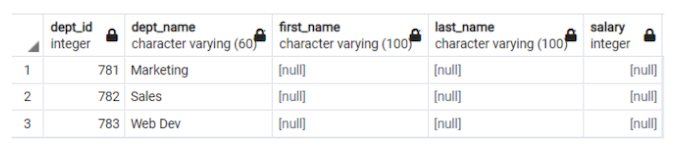
Figure 10. The result of the nulled query (Mohammed Kamil Khan, CC BY-SA 4.0)
The nulled query uses CASE WHEN on the nulls encountered in the dept_id and dept_name columns of the null1 table and replaces them with the corresponding values in the full1 table. Now all I need to do is apply UNION to the tables obtained in Figure 7 and Figure 10. This can be accomplished by declaring the last query in the previous code using WITH and then UNION-izing it with null1.
 SELECT * FROM (WITH null1 AS (SELECT A.dept_id, A.dept_name, A.first_name, A.last_name, A.salary
 FROM (SELECT * FROM (
 SELECT department.dept_id, department.dept_name, employee.first_name, employee.last_name,
 employee.salary, DENSE_RANK() OVER (PARTITION BY employee.dept_id ORDER BY employee.salary DESC) AS Rank1
 FROM employee INNER JOIN department
 ON employee.dept_id=department.dept_id) AS k
 WHERE rank1=4)A),
 full1 AS (SELECT dept_id, dept_name FROM department WHERE dept_id NOT IN (SELECT dept_id FROM null1 WHERE dept_id IS NOT NULL)),
 nulled AS(SELECT
 CASE WHEN null1.dept_id IS NULL THEN full1.dept_id ELSE null1.dept_id END,
 CASE WHEN null1.dept_name IS NULL THEN full1.dept_name ELSE null1.dept_name END,
 first_name,last_name,salary
 FROM null1 RIGHT JOIN full1 ON null1.dept_id=full1.dept_id)
 SELECT * FROM null1
 UNION
 SELECT * FROM nulled
 ORDER BY dept_id)
 B;
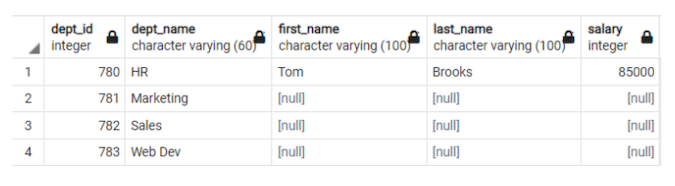
Figure 11. The final result (Mohammed Kamil Khan, CC BY-SA 4.0)
Now I can infer from Figure 11 that marketing, sales, and web dev are the departments that do not have any employees earning the fourth-highest salary.
A step-by-step breakdown of the query.

 This work is licensed under a Creative Commons Attribution-Share Alike 4.0 International License.
: Opensource.com Mohammed Kamil Khan
Supporting Open Source.
Have you tried: Farking?