
How I use Groovy to analyze album art in my music directory: How I use Groovy to analyze album art in my music directory Chris Hermansen Sun, 08/28/2022 – 03:00
In this series, I’m developing several scripts to help in cleaning up my music collection. In the last article, I used the framework I created for analyzing the directory and sub-directories of music files and carried out the analysis with the fine open source JAudiotagger library to analyze the tags of the music files in the music directory and subdirectories. In this article, I will do a simpler job:
- Use the framework we created in Part 1
- Make sure each album directory has a
cover.jpgclass - Make a note of any other files in the album directory that aren’t FLAC, MP3 or OGG.
Music and metadata
If you haven’t read part 1 and part 2 of this series, do that now so you understand the intended structure of my music directory, the framework created in that article, and how to pick up FLAC, MP3, and OGG files.
One more thing. Most audio ripping applications and many downloads:
- Don’t come with a useful
cover.jpgfile - Even if they do come with a useful
cover.jpgfile, they don’t link the media files to it - Carry in all sorts of other files of dubious utility (for example,
playlist.m3u, which gets created by a tagging utility I’ve used in the past)
As I mentioned in my last article, the ultimate goal of this series is to create a few useful scripts to help identify missing or unusual tags and facilitate the creation of a work plan to fix tagging problems. This particular script looks for missing cover.jpg files and unwanted non-media files, and creates a CSV file that you can load into LibreOffice or OnlyOffice to look for problems. It won’t look at the media files themselves, nor does it look for extraneous files left in the artist subdirectories (those are exercises left for the reader).
The framework and album files analysis
Start with the code. As before, I’ve incorporated comments in the script that reflect the (relatively abbreviated) “comment notes” that I typically leave for myself:
      1  // Define the music library directory

      2  def musicLibraryDirName = '/var/lib/mpd/music'

      3  // Print the CSV file header

      4  println "artist|album|cover|unwanted files"

      5  // Iterate over each directory in the music libary directory
      6  // These are assumed to be artist directories

      7  new File(musicLibraryDirName).eachDir { artistDir ->

      8      // Iterate over each directory in the artist directory
      9      // These are assumed to be album directories

     10      artistDir.eachDir { albumDir ->

     11          // Iterate over each file in the album directory
     12          // These are assumed to be content or related
     13          // (cover.jpg, PDFs with liner notes etc)

     14          // Initialize the counter for cover.jpg
     15          // and the list for unwanted file names

     16          def coverCounter = 0
     17          def unwantedFileNames = []

     18          albumDir.eachFile { contentFile ->

     19              // Analyze the file

     20              if (contentFile.name ==~ /.*\.(flac|mp3|ogg)/) {
     21                  // nothing to do here
     22              } else if (contentFile.name == 'cover.jpg') {
     23                  coverCounter++
     24              } else {
     25                  unwantedFileNames << contentFile.name
     26              }

     27          }
     28          println "$  {artistDir.name}|$  {albumDir.name}|$  coverCounter|$  {unwantedFileNames.join(',')}"
     29      }
     30  }
Lines 1-2 define the name of the music file directory.
Line 3-4 print the CSV file header.
Lines 5-13 come from the framework created in Part 1 of this article and get down to the album sub-subdirectories.
Lines 14-17 set up the cover.jpg counter (should only ever be zero or one) and the empty list in which we will accumulate unwanted file names.
Lines 18-27 analyze any files found in the album directories:
Lines 20-21 uses the Groovy match operator ==~ and a “slashy” regular expression to check file name patterns. Nothing is done with these files (see Part 2 for that information).
Lines 22-23 count the instances of cover.jpg (it should only ever be zero or one).
Lines 24-26 record the names of any non-media, non-cover.jpg files to show potential cruft or who-knows-what in the album directories.
Line 28 prints out the artist name, album name,
That’s it!
Running the code
Typically, I run this as follows:
$ groovy TagAnalyzer3.groovy > tagAnalysis3.csv
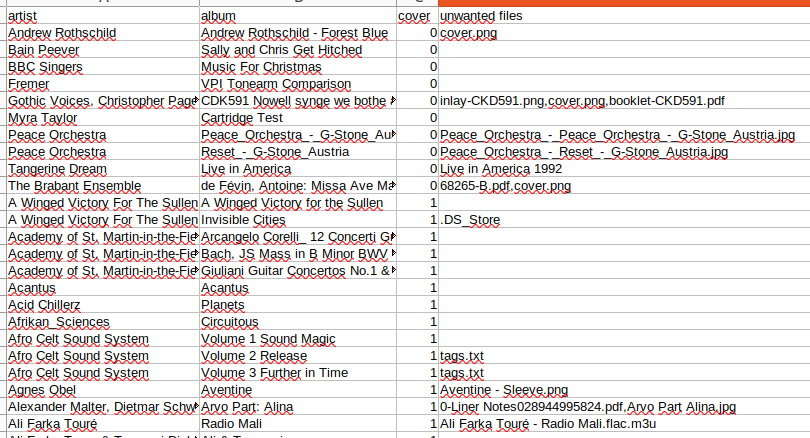
Then I load the resulting CSV into a spreadsheet. For example, with LibreOffice Calc , go to the Sheet menu and select Insert sheet from file. When prompted, set the delimiter character to |. In my case, the results look like this:
(Chris Hermansen, CC BY-SA 4.0)
I’ve sorted this in increasing order of the column “cover” to show album sub-subsubdirectories that don’t have cover.jpg files. Note that some have cover.png instead. My experience with music players is that at least some don’t play well with PNG format cover images.
Also, note that some of these have PDF liner notes, extra image files, M3U playlists, and so on. In my next article, I’ll show you how to manage some of the cruft.
Here’s how I use open source tools to analyze my music directory including album cover files.
Opensource.com
 This work is licensed under a Creative Commons Attribution-Share Alike 4.0 International License.
: Opensource.com Chris Hermansen
Supporting Open Source.
Have you tried: Sailing in Africa ?