
How I automate plant care using Raspberry Pi and open source tools: How I automate plant care using Raspberry Pi and open source tools Kevin Sonney Sat, 05/28/2022 – 03:00
Automation is a hot topic right now. In my day job as an SRE part of my remit is to automate as many repeating tasks as possible. But how many of us do that in our daily, not-work, lives? This year, I am focused on automating away the toil so that we can focus on the things that are important.
Home Assistant has so many features and integrations, it can be overwhelming at times. And as I’ve mentioned in previous articles, I use it for many things, including monitoring plants.
 $   bluetoothctl scan le
 Discovery started
 [NEW] Device
 [NEW] Device
 [NEW] Device
 [NEW] Device
 [NEW] Device
 [NEW] Device
 [NEW] Device
There are numerous little devices you can buy to keep an eye on your plants. The Xiomi MiaFlora devices are small, inexpensive, and have a native integration with Home Assistant. Which is great—as long as the plant and Home Assistant are in the same room.
We’ve all been in places where one spot there is a great signal, and moving 1mm in any direction makes it a dead zone—and it is even more frustrating when you are indoors. Most Bluetooth LE (Low Energy) devices have a range of about 100m, but that’s using line of sight, and does not include interference from things like walls, doors, windows, or major appliances (seriously, a refrigerator is a great big signal blocker). Remote Home Assistant is perfect for this. You can set up a Raspberry Pi with Home Assistant Operating System (HASSOS) in the room with the plants, and then use the main Home Assistant as a central control panel. I tried this on a Raspberry Pi Zero W, and while the Pi Zero W can run Home Assistant, it doesn’t do it very well. You probably want a Pi 3 or Pi 4 when doing this.
Start with a fresh HASSOS installation, and make sure everything is up-to-date, then install HACS and Remote Home Assistant like I did in my article Automate and manage multiple devices with Remote Home Assistant. Now for the tricky bits. Install the SSH and Web Terminal Add-on, and turn off Protection Mode so that you can get a session on the base OS and not in a container. Start the add-on, and it appears on the sidebar. Click on it to load the terminal.
You are now in a root session terminal on the Pi. Insert all the warnings here about being careful and how you can mess up the system (you know the ones). Inside the terminal, run bluetoothctl scan le to find the plant sensor, often named “Flower Care” like mine.
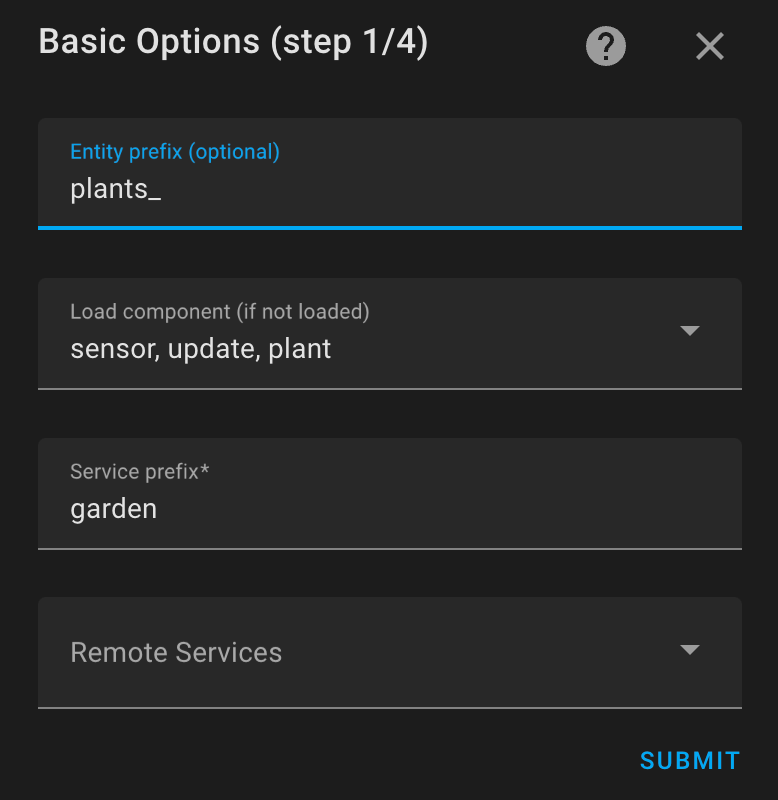
(Kevin Sonney, CC BY-SA 40)
Make a note of the address for the plant sensor. If you have more than one, it could be confusing to figure out which is which, and can take some trial and error. Once you’ve identified the plant sensor, it is time to add it to Home Assistant. This requires editing the configuration.yml file directly, either with the file editor add on, or in the terminal you just created. In my case, I added both a sensor and a plant block to the configuration.
 sensor:
   - platform: miflora
     scan_interval: 60
     mac: "C4:7C:8D:6C:DE:FE"
     name: "pitcher_plant"
     plant:
     pitcher_plant:
         sensors:
             moisture: sensor.pitcher_plant_moisture
             battery: sensor.pitcher_plant_battery
             temperature: sensor.pitcher_plant_temperature
             conductivity: sensor.pitcher_plant_conductivity
             brightness: sensor.pitcher_plant_brightness
Save the file, and restart Home Assistant, and you should see a plant card on the Overview tab.
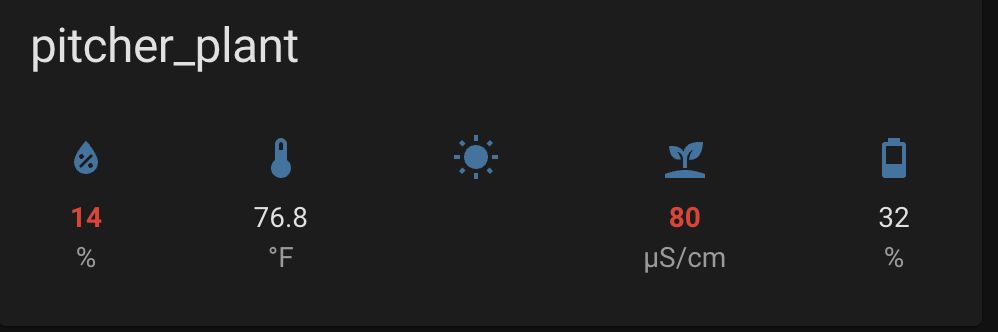
(Kevin Sonney, CC BY-SA 40)
Once that’s done, go back to the main Home Assistant, and add the newly available plant component to the list of things to import from the remote. You can then add the component to dashboards on the main HASS installation, and create automations and notifications based on the plant status.
I use this to monitor a pitcher plant, and I have more sensors on the way so I can keep tabs on all my houseplants—all of which live outside the Bluetooth range of my central Home Assistant Pi.
I keep tabs on all my houseplants by using Home Assistant and a Raspberry Pi.

Opensource.com
 This work is licensed under a Creative Commons Attribution-Share Alike 4.0 International License.
: Opensource.com Kevin Sonney
Supporting Open Source.
Have you tried: Visiting Port Elizabeth?