
Edit your photos with open source artificial intelligence: Edit your photos with open source artificial intelligence Don Watkins Sat, 04/15/2023 – 03:00
I’ve been interested in photography ever since I co-opted my father’s Kodak 620 camera as a young boy. I used it to take pictures of the flora and fauna of our neighborhood. My love of photography led me to an Instamatic camera in high school, and eventually to digital cameras as they entered the marketplace in the late 1990s. Early digital cameras provided portability and the ability to quickly capture and easily share images on the internet. But they lacked the quality and complexity of the best of film photography. Of course digital cameras have improved a lot since then. But I have years of digital photographs that just look a little, well, little on modern devices.
Until recently, my go-to tool for upscaling digital images has been GIMP. A couple of years ago, I tried to use GIMP to upscale a thumbnail image of my father that was taken in the mid-1940s. It worked, but the photo lacked the detail, depth, and clarity that I wanted.
That’s all changed since I learned about Upscayl, a free and open source program that uses open source artificial intelligence to upscale low-resolution images.
Upscayl
Upscayl works on Linux, Windows, and macOS.
It’s easy to install on Linux whether your system uses RPM or DEB packages, and its website contains a universal Linux AppImage too.
For macOS and Windows, you can download installers from the project’s website. Upscayl is released with an AGPL license.
Get started with Upscayl
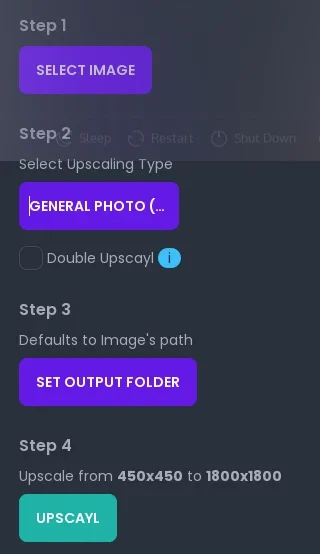
Once installed, you can begin upscaling your images. The GUI software is very easy to use. The software makes your old images look like they were taken yesterday with image resolutions that far exceed the originals. In addition, you can batch scale entire folders and photo albums of images and upscale them all at once.
(Don Watkins, CC BY-SA 4.0)
Launch the software and click the Select Image button. Find the image or folder of images you want to upscale.
Once the image is loaded, select the type of upscaling you want to try. The default is Real-ESRGAN, and that’s a good place to start. There are six options to choose from, including a selection for digital art.
- General photo with Real-ESRGAN
- General photo with remacri
- General photo with ultramix balanced
- General photo with ultrasharp
- Digital Art
- Sharpen Image
Next, select the output directory where you want your upscaled images to be saved.
And finally, click the Upscayl button to begin the upscaling process. The speed of conversion depends on your GPU and the image output choice you make.
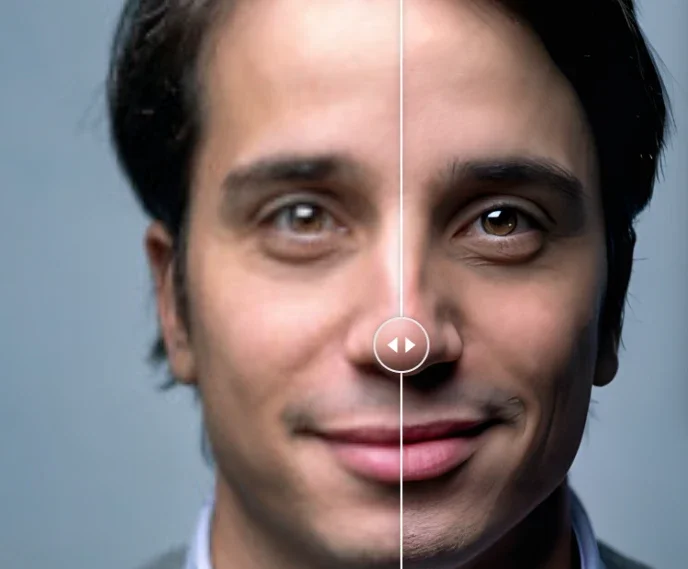
Here’s a test image, with the low-resolution image on the left and the Upscayl version on the right:
(Derived from Jurica Koleti?, Unsplash License)
Time to try Upscayl for your images
Upscayl is one of my favorite upscaling applications. It does depend heavily on your GPU, so it may not work on an old computer or one with an especially weak graphics card. But there’s no harm in giving it a try. So download it and try it. I think you’ll be impressed with the results.
Upscayl is a free and open source program that uses open source artificial intelligence to upscale low-resolution images.

 This work is licensed under a Creative Commons Attribution-Share Alike 4.0 International License.
: Opensource.com Don Watkins
Supporting Open Source.
Have you tried: Travelling to South Africa?