
Discover the power of the Linux SpaceFM file manager: Discover the power of the Linux SpaceFM file manager sethkenlon Mon, 12/19/2022 – 03:00
SpaceFM is a tabbed file manager for Linux using the GTK toolkit, so it fits right in on desktops like GNOME, Mate, Cinnamon, and others. SpaceFM also features a built-in device manager system, so it’s particularly good for window managers, like Fluxbox or fvwm, which typically don’t include a graphical device manager. If you’re happy with the file managers on Linux, but you want to try one that’s a little bit different in design, SpaceFM is worth a look.
Install SpaceFM
On Linux, you’re likely to find SpaceFM in your distribution’s software repository. On Fedora, Mageia, OpenMandriva, and similar:
$ sudo dnf install spacefm
On Debian and Debian-based systems:
$ sudo apt install spacefm
Panels
I don’t know why SpaceFM is called SpaceFM, but it could be because it makes a concerted effort to let you use every bit of space in its window for something useful. By default, SpaceFM is actually pretty simple, standard-issue file manager. It has a single panel listing your files, a toolbar, and a menu bar.
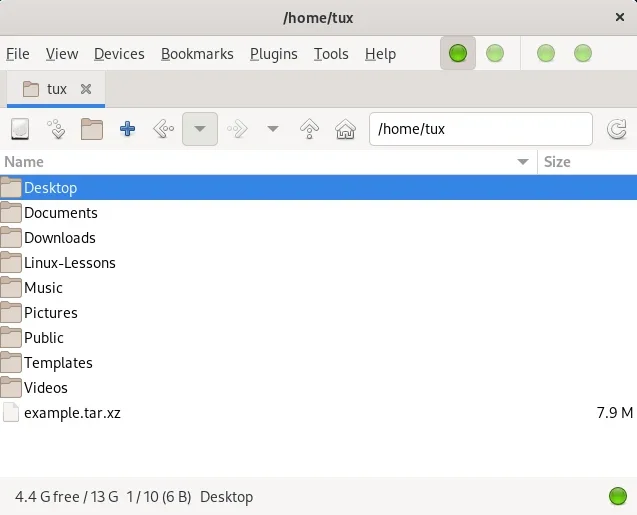
(Seth Kenlon, CC BY-SA 4.0)
All the “usual” rules apply.
-
Double-click to open a directory or to open a file in its default application.
-
Right-click for a contextual menu providing lots of standard options (copy, paste, rename, view properties, create a new folder, and so on).
The way SpaceFM sets itself apart, though, is its panel system. SpaceFM displays one panel by default. That’s the big file window listing your files. But it can have up to four panel views, plus a few bonus panels for some specific tasks.
Opening a new panel
Instead of seeing one directory in your file manager, you can see two. To bring up another directory in its own pane, press Ctrl+2 or go to the View menu and select Panel 2. Alternatively, click the second green dot icon from the left in the menu panel.
With two panels, you can move files from one directory to another without opening a new file manager window, or you can browse two directories to compare their contents.
But why settle for two panels? Maybe you’d rather see three directories at once. To bring up a third directory in a dedicated pane, press Ctrl+3 or go to the View menu and select Panel 3. Alternatively, click the third green dot icon from the left in the menu panel. This panel appears at the bottom of the SpaceFM window.
With three panels open, you can move files between several directories, or sort files from a common “dumping ground” (like your Desktop or Downloads folder) into specific directories.
Of course, once you’ve tried three panels you’ll probably find yourself itching for a fourth. To open a fourth directory in its own pane, press Ctrl+4 or go to the View menu and select Panel 4. Alternatively, click the fourth green dot icon from the left in the menu panel. This one opens next to Panel 3, splitting your SpaceFM window into even quarters.
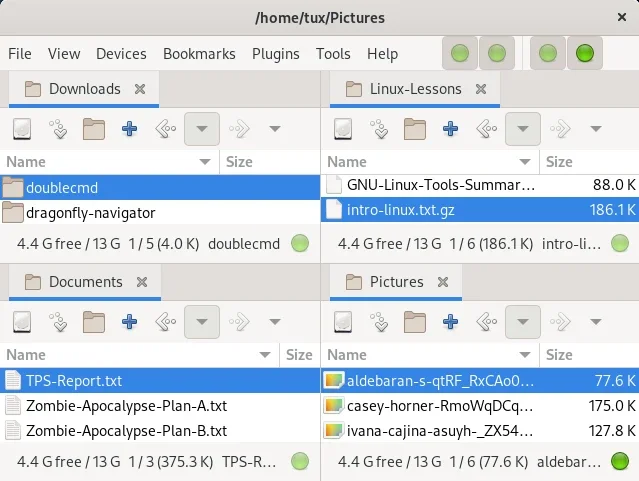
(Seth Kenlon, CC BY-SA 4.0)
What about a fifth panel? Well, actually SpaceFM stops at four panels. If you really do want a fifth panel, you have to open a new SpaceFM window. However, there are still more panels, used for information other than file listings, to explore.
Special panels
The View menu reveals that in addition to file panels, there are additionally task-specific panels you can choose to display. This includes:
-
Task manager: Lists ongoing file manager processes. This isn’t a general-purpose task manager, so to set nice values or detect a zombie apocalypse of undead PIDs, htop or top is still your utility of choice.
-
Bookmarks: Links to common folders, such as Desktop, Documents, Downloads, and any location you want to keep handy.
-
Devices: USB thumb drives and remote file systems.
-
File tree: A view of your file system in order of directory inheritance.
These panels open on the left side of SpaceFM, but they do stack. You can have bookmarks, devices, tasks, and a file tree open at once, although it helps to have a very tall SpaceFM window.
Make space for SpaceFM
SpaceFM is a configurable multi-tasking file manager. It maximizes the information you can build into a single window, and it lets you decide what’s important, and when. This article has focused on the panels of SpaceFM because those are, at least in my view, the most unique aspect of the application. However, there’s a lot more to SpaceFM, including plugins, preferences, a design mode, keyboard shortcuts, and customization. This isn’t a small application, even though it is a lightweight one. Spend some time with SpaceFM, because you never know what you’ll discover.
If you’re happy with the file managers on Linux, but you want to try one that’s a little bit different in design, SpaceFM is worth a look.

Opensource.com
 This work is licensed under a Creative Commons Attribution-Share Alike 4.0 International License.
: Opensource.com sethkenlon
Supporting Open Source.
Have you tried: Visiting Port Elizabeth?