
Clean up unwanted files in your music directory using Groovy: Clean up unwanted files in your music directory using Groovy Chris Hermansen Mon, 08/29/2022 – 03:00
In this series, I’m developing several scripts to help in cleaning up my music collection. In the last article, we used the framework created for analyzing the directory and sub-directories of music files, checking to make sure each album has a cover.jpg file and recording any other files that aren’t FLAC, MP3, or OGG.
I uncovered a few files that can obviously be deleted—I see the odd foo lying around—and a bunch of PDFs, PNGs, and JPGs that are album art. With that in mind, and thinking about the cruft removal task, I offer an improved script that uses a Groovy map to record file names and counts of their occurrences and print that in CSV format.
Get started analyzing with Groovy
If you haven’t already, read the first three articles of this series before continuing:
- How I analyze my music directory with Groovy
- My favorite open source library for analyzing music files
- How I use Groovy to analyze album art in my music directory
They’ll ensure you understand the intended structure of my music directory, the framework created in that article, and how to pick up FLAC, MP3, and OGG files. In this article, I facilitate removing unwanted files in the album directories.
The framework and the album files analysis bits
Start with the code. As before, I’ve incorporated comments in the script that reflect the (relatively abbreviated) “comment notes” that I typically leave for myself:
 1        // Define the music libary directory
 2        // def musicLibraryDirName = '/var/lib/mpd/music'
 3        // Define the file name accumulation map
 4        def fileNameCounts = [:]
 5        // Print the CSV file header
 6        println "filename|count"
 7        // Iterate over each directory in the music libary directory
 8        // These are assumed to be artist directories
 9        new File(musicLibraryDirName).eachDir { artistDir ->
 10            // Iterate over each directory in the artist directory
 11            // These are assumed to be album directories
 12            artistDir.eachDir { albumDir ->
 13                // Iterate over each file in the album directory
 14                // These are assumed to be content or related
 15                // (cover.jpg, PDFs with liner notes etc)
 16                albumDir.eachFile { contentFile ->
 17                    // Analyze the file
 18                    if (contentFile.name ==~ /.*\.(flac|mp3|ogg)/) {
 19                        // nothing to do here
 20                    } else if (contentFile.name == 'cover.jpg') {
 21                        // don't need to do anything with cover.jpg
 22                    } else {
 23                        def fn = contentFile.name
 24                        if (contentFile.isDirectory())
 25                            fn += '/'
 26                        fileNameCounts[fn] = fileNameCounts.containsKey(fn) ?  fileNameCounts[fn] + 1 : 1
 27                    }
 28                }
 29            }
 30        }
 31        // Print the file name counts
 32        fileNameCounts.each { key, value ->
 33            println "$  key|$  value"
 34        }
This is a pretty straightforward set of modifications to the original framework.
Lines 3-4 define fileNameCount, a map for recording file name counts.
Lines 17-27 analyze the file names. I avoid any files ending in .flac, .mp3 or .ogg as well as cover.jpg files.
Lines 23-26 record file names (as keys to fileNameCounts) and counts (as values). If the file is actually a directory, I append a / to help deal with it in the removal process. Note in line 26 that Groovy maps, like Java maps, need to be checked for the presence of the key before incrementing the value, unlike for example the awk programming language.
That’s it!
I run this as follows:
$ groovy TagAnalyzer4.groovy > tagAnalysis4.csv
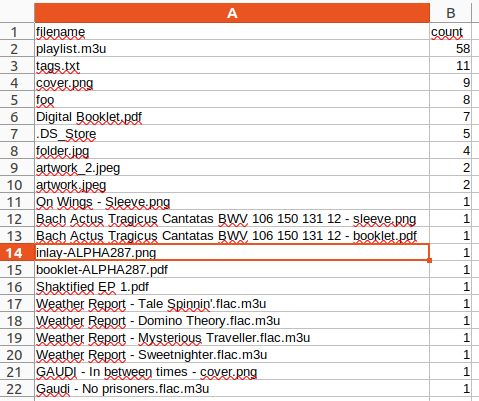
Then I load the resulting CSV into a LibreOffice spreadsheet by navigating to the Sheet menu and selecting Insert sheet from file. I set the delimiter character to &$ 124;.
(Chris Hermansen, CC BY-SA 4.0)
I’ve sorted this in decreasing order of the column count to emphasize repeat offenders. Note as well on lines 17-20 a bunch of M3U files that refer to the name of the album, probably created by some well-intentioned ripping program. I also see, further down (not shown), files like fix and fixtags.sh, evidence of prior efforts to clean up some problem and leaving other cruft lying around in the process. I use the find command line utility to get rid of some of these files, along the lines of:
 $   find . \( -name \*.m3u -o -name tags.txt -o -name foo -o -name .DS_Store \
 -o -name fix -o -name fixtags.sh \) -exec rm {} \;
I suppose I could have used another Groovy script to do that as well. Maybe next time.
In this demonstration, I facilitate removing unwanted files in the album directories.
Opensource.com
 This work is licensed under a Creative Commons Attribution-Share Alike 4.0 International License.
: Opensource.com Chris Hermansen
Supporting Open Source.
Have you tried: Visiting Port Elizabeth?