
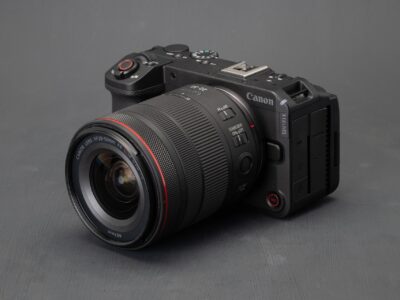
We used Canon’s creator-focused camera to produce several videos for our YouTube channel.
 Mitchell Clark
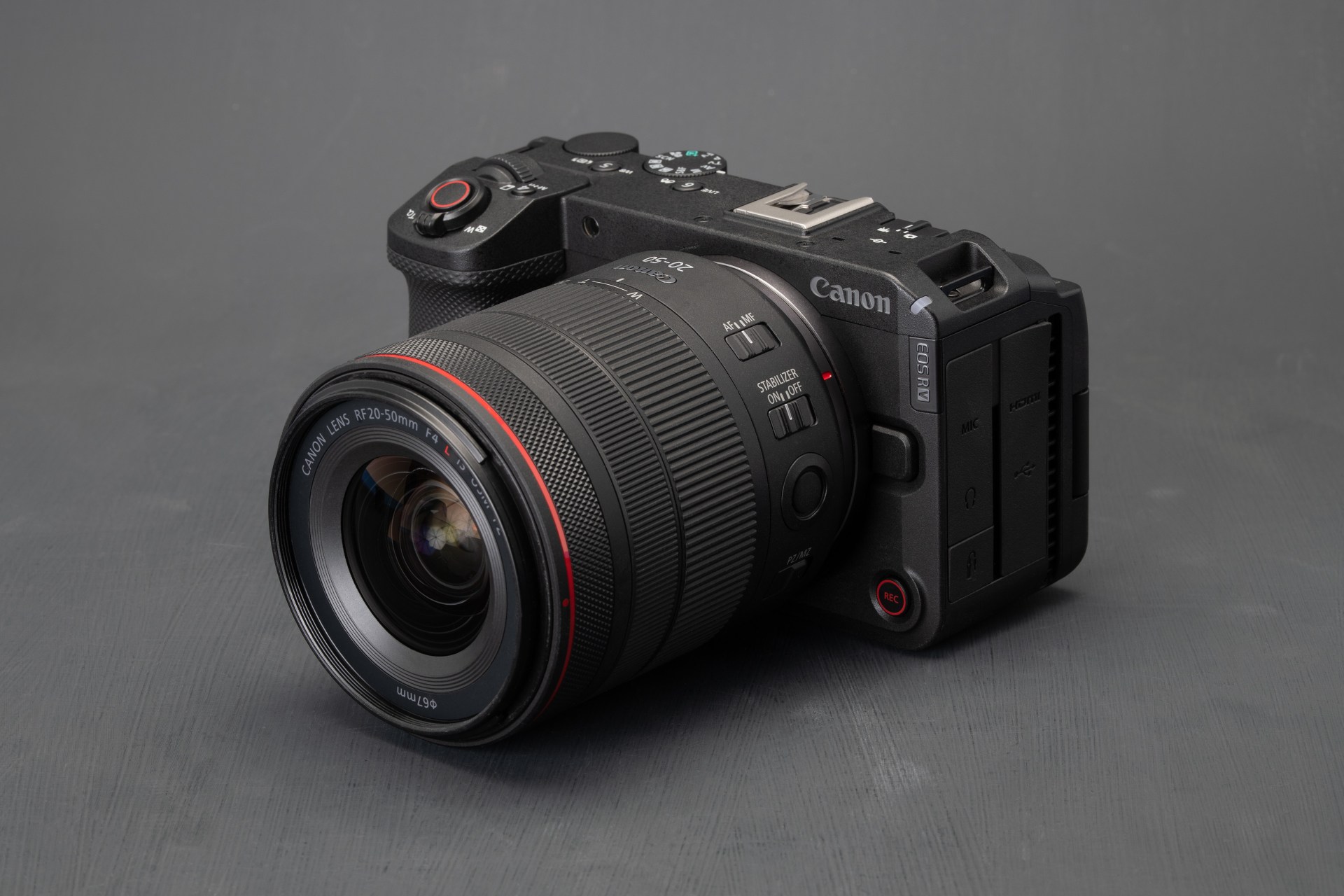
The Canon EOS R6 V is a video camera designed for “advanced creatives,” built around the same 32MP full-frame sensor and processor as the company’s hybrid mirrorless EOS R6 III. It has a boxier design, having lopped off the EVF (and mechanical shutter), and added a fan to help prevent overheating when using its more ambitious recording modes.
It retails for $2499, $300 less than the EOS R6 III. There’s also a version with special firmware features for recording stop motion, available for $100 more. The camera launched alongside the RF 20-50mm F4 L IS USM PZ, a video-focused power zoom lens that you can buy kitted with the camera for $3699, $200 less than if you bought the body and lens separately.
Key specifications:
- 32MP full-frame CMOS sensor
- Built-in fan
- 7K recording up to 60p (Canon Cinema Raw Lite)
- Full-width oversampled 4K ?60p, subsampled 4K 120p
- 3:2 Open Gate recording up to 30p
- Built-in image stabilization rated to 8.5EV
- 3.0?, 1.62M dot fully-articulating screen
- Dual tripod mounts for horizontal/landscape shooting
Index:
- What’s new
- How it compares
- Body and handling
- Video capabilities
- Video quality
- Conclusion
- Specifications
Loading gallery…
What’s new
A new design
 Mitchell Clark
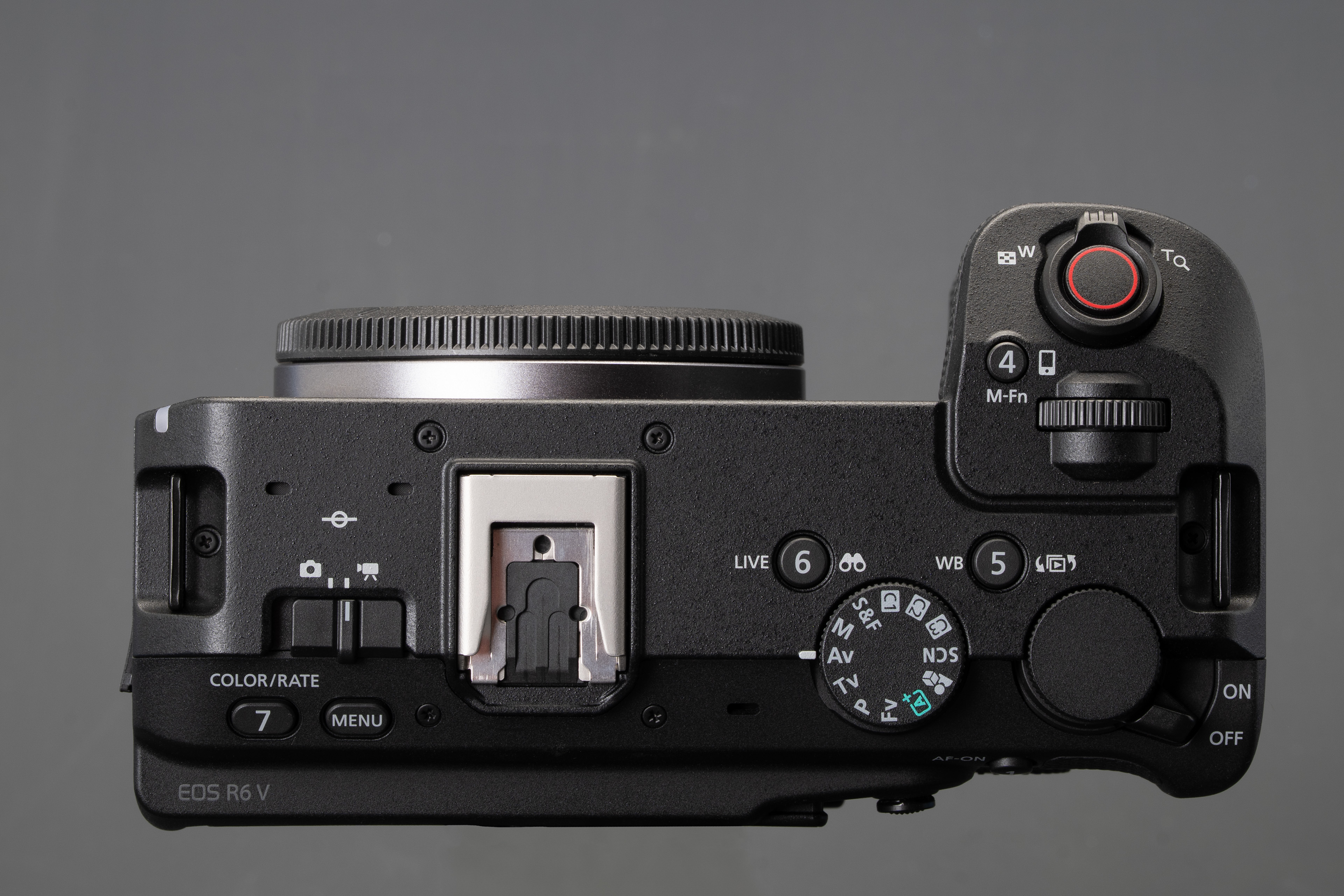
While the EOS R6 V’s capabilities are very similar to the EOS R6 III’s, its design and controls are centered around video. Much like the APS-C EOS R50 V, it has a flat top plate designed to play well with gimbals, and both top- and front-plate record buttons, with the former also having a zoom lever around it.
The EOS R6 V has the customary 1/4-20? tripod mount on its base, along with an additional one on the side of the grip. This lets you easily mount the camera vertically when shooting for social media, though the cards would then be hard to access.
Keeping cool

Perhaps the biggest performance differentiator between the EOS R6 V and R6 III is that the new camera has a fan, which Canon says will allow it to record heavy formats for much longer, even under warm conditions. When the EOS R6 III launched, Canon said it could only record 20 to 30 minutes of oversampled 4K/60 or open gate 7K before overheating. With the Canon EOS R6 V, though, the company is promising two hours or more in those modes, even in ambient temperatures of 30°C (86°F), as long as you have the fan and overheat limits set to high, and you have the camera on a tripod to avoid that heat going into your hands.
Canon says the fan in the EOS R6 V is smaller than the one found in the Cinema EOS C50, a higher-end camera that uses the same sensor but with features and menus aimed at professional use on budgeted sets. While more consumer-oriented version should perform well under most circumstances, the pro-grade camera is designed to essentially never overheat, no matter how long you’re shooting for, or how hot the conditions are.
More menu options
The camera also gains several video-focused features. It has a product-focused “Close-up demos” mode that temporarily overrides face recognition AF when you’re holding up something to the camera. Unlike on previous Canon cameras where it was a scene mode that severely limited your control over exposure and audio settings, it’s now just an AF option that you can enable across video modes. (This feature wasn’t included on the EOS R6 III at launch, but has since been added via a software update.)

The EOS R6 V also offers granular control over white balance, letting you customize how quickly its auto system will adjust when, say, moving from an indoor to outdoor setting. You can also assign a custom button to lock white balance, and to switch between up to four pre-selected Kelvin settings.
It uses the same menu system from Canon’s other consumer-focused EOS cameras, rather than borrowing the production-focused UI of Canon’s Cinema line, like the Cinema EOS C50 uses. While this undoubtedly makes the camera simpler for a beginner to pick up, it also means more advanced users won’t have the ability to set shutter angle, rather than speed, or to get a desqueezed preview when using anamorphic lenses.
Video-first

In terms of stills, the EOS R6 V has similar capabilities to the EOS R6 III, in that it can shoot 32MP images in burst rates of up to 40fps. However, if you want to shoot fast-moving subjects, you don’t have the option of dropping down to a slower burst rate that uses the mechanical shutter to minimize rolling shutter like you get with the hybrid option. This also limits its capabilities for flash shooting, as it can’t sync above 1/60th of a second.
How it compares
The EOS R6 V doesn’t gain any video modes over the EOS R6 III and, apart from the expanded white balance settings, offers largely the same toolbox of video assist features, so there’s no real reason to include Canon’s hybrid model in this chart. Instead, we’ll take a look at the other full-frame enthusiast video options in the market, to highlight the distinct approaches each manufacturer has taken.
We’ve chosen Panasonic’s S1II as its enthusiast video camera; there’s an argument to be made for the S9 being its most video and creator-focused full-frame camera, but its price point, much slower sensor and relatively pared-down controls and ports mean its designed for a very different kind of shooting than the rest of these cameras.
| Canon EOS R6 V | Nikon ZR | Panasonic S1II | Sony ZV-E1 | |
|---|---|---|---|---|
| MSRP at launch | $2499 | $2200 | $3200 | $2200 (body only), $2500 with 28-80mm F4-5.6 |
| Sensor | 32.3MP FSI CMOS |
24.5MP BSI CMOS |
24.1MP BSI CMOS |
12.1MP BSI CMOS |
| Video modes | 7K/60 Raw 7K/30 compressed 4K/120 full-width 4K/60 oversampled |
6K/60 Raw 5.4K/60 compressed 4K/120 1.5x crop 4K/60 full-width, oversampled |
6K/30 open-gate 5.9K/60 4K/120p 1.17x crop 4K/60p full-width, oversampled |
4K/120 full-width |
| Open gate? | Yes | Via future firmware | Yes | No |
| Video options | Canon Cinema Raw (Standard, Light) H.265 H.264 |
R3D NE N-Raw ProRes Raw ProRes H.265 H.264 |
ProRes RAW ProRes H.265 H.264 |
XAVC HS (H.265) XAVC S (H.264) XAVC S-I |
| EVF | None | None | 5.76M dot 0.78x |
None |
| Rear screen | 3?, 1.62M dot Fully-articulating |
4?, 3.07M dot Fully-articulating |
3?, 1.84M dot Fully-articulating/Tilting |
3?, 1.04M dot Fully-articulating |
| 32-bit float audio | No | Internal | Via XLR adapter | No |
| Video assistance tools | False color overlay Waveform monitor Custom LUT preview Aspect ratio overlay |
Shutter angle Waveform monitor Custom LUT preview |
False color overlay Waveform monitor Shutter angle Custom LUT preview Aspect ratio overlay Baked-in LUTs Anamorphic desqueeze |
AI auto-framing LUT preview Baked-in LUTs |
| Storage | 1x CFexpress Type B 1x UHS-II SD |
1x CFexpress Type B 1x UHS-I microSD |
1x CFexpress Type B 1x UHS-II SD |
1x UHS-II SD |
| Ports | Mic/Headphone HDMI USB-C (10Gbps w/ UVC) |
Mic/Headphone microHDMI USB-C (5Gbps w/UVC) |
Mic/Headphone HDMI USB-C (10Gbps w/ UVC) |
Mic/Headphone microHDMI USB-C (10Gbps w/ UVC) |
| Battery life | 510 shots | 350 shots | 350 shots | 570 shots |
| Weight | 688g (24oz) | 630g (22oz) | 800g (28oz) | 483g (17oz) |
| Dimensions | 142 x 83 x 80mm (5.6 x 3.3 x 3.1?) |
133 x 81 x 49mm (5.2 x 3.2 x 1.9?) |
134 x 102 x 92mm (5.3 x 4.0 x 3.6?) |
121 x 72 x 54mm (4.8 x 2.8 x 2.1?) |
The ZV-E1 is built with the assumption that you’re filming yourself without a cameraperson, which is why it has features like AI auto-framing, which automatically crops and pans within your footage to create a dynamic look that emulates a cameraperson following you around. It’s also a fair bit older than the others, and lacks what are now relatively standard features such as open-gate or >4K recording, waveform monitoring for more accurate exposure and internal Raw (as useful as that may or may not be). It does, however, let you bake LUTs into your footage to cut down on the need to edit.
While the Panasonic and the ZR have very similar sensors, they utilize them a bit differently. Panasonic includes a high-DR mode that allows you to trade higher rolling shutter rates for cleaner shadows, whereas the ZR opts to apply relatively heavy levels of noise reduction to its compressed footage when shooting in Log to tamp down on its sensor’s slightly noisy shadows. Neither the ZR nor the S1II have full-width 4K/120 recording, meaning you’ll have to deal with changing your framing, which isn’t an issue with the EOS R6 V (though, as we’ll see later, this comes at the cost of greatly reduced detail).
Body and handling
 Mitchell Clark
The EOS R6 V’s inclusion of a fan means it’s quite substantial in the hand, though I still found it relatively easy to hold during long shoots, even if I wasn’t confident enough to use it without some kind of strap. The camera has two command dials and a wide array of customizable buttons, most of which are reachable with one hand (though there are a few places in the interface where the camera will require you to press the “Menu” button to confirm something, requiring the use of a second hand).
Unsurprisingly, the camera has a tally lamp on the front to make it obvious when you’re recording. There’s also a front-facing record button, which can be handy when using the camera while its facing you or while its top plate is cluttered up with a cage and accessories. We also didn’t find it quite as prone to accidental presses as some of the ones found on other cameras.
Connectivity
 Mitchell Clark
The EOS R6 V has what we’d consider to be a full suite of ports: 10Gbps USB-C, full-size HDMI, mic and headphone sockets, an E3 terminal for remote control and a multi-interface shoe which you can use to attach Canon’s DM-E1D microphone. (Of course, you can also control it over Wi-Fi using Canon’s quite capable app.) If you want a dedicated timecode port, you’ll have to move up to the cinema-focused Canon C50.
Canon has also included the ability to use the EOS R6 V as a USB webcam without the need for specialized drivers or software, via the UVC/UAC standard. It can run at up to 4K/60, though you’ll be limited to FullHD if you want your computer to supply power to the camera.
The camera has a CFexpress Type B slot and one UHS-II SD slot, and can record FullHD proxies to one while recording full-res footage to the other. If you’re shooting Raw, you also have the option of recording your Raw footage to the CFexpress card, and 4K footage to the SD card.
Battery
 Mitchell Clark
The EOS R6 V uses Canon’s now-standard LP-E6P battery. Canon says it should be able to record around 1 hour and 50 minutes of oversampled 4K/30, which drops to about an hour when shooting at 4K/60. In our use, we found it could reliably last through a full shoot, and that we were ending the day without seeing the battery icon blinking to indicate that it was critically low. Still, for extremely heavy days, it’s probably worth packing a spare, or a USB PD-compliant battery bank.
Video capabilities
 Mitchell Clark
The EOS R6 V has a variety of shooting modes that go up to 7K, and the menus for managing which mode you’re in are relatively sensible, letting you choose your resolution and sampling mode, frame rate, and compression separately. This makes it easy to switch between all of the camera’s modes, though it’s not quite as quick if you’re only switching between two or three, where a favorites list like you’ll find on Panasonic’s cameras comes in handy. There are a few quirks with the system – if you’re shooting in H.265, there’s only one compression option (you get three flavors of Intra in H.264), and there are some combinations of framerate and resolution that don’t work – but I generally prefer this selection method to a massive list of every possible recording mode.
| Dimensions | Rates | Raw | |
|---|---|---|---|
| 1.89:1 | |||
| 7K | 6960 x 3672 | 60, 50, 48, 30, 25, 24, 23.98 | ST (up to 30p), LT |
| DCI 4K | 4096 x 2160 | 120, 100, 60, 50, 48, 30, 25, 24, 23.98 | – |
| DCI 2K | 2048 x 1080 | 180* , 150* , 120, 100, 60, 50, 48, 30, 25, 24, 23.98 |
– |
| 16:9 modes | |||
| UHD 4K | 3840 x 2160 | 120, 100, 60, 50, 48, 30, 25, 24, 23.98 | – |
| Full HD | 1920 x 1080 | 180* , 150* , 120, 100, 60, 50, 48, 30, 25, 24, 23.98 |
– |
| 3:2 Open gate | |||
| 7K Raw | 6960 x 4640 | 30, 25, 24, 23.98 | ST, LT |
| 7K Compressed | 6912 x 4608 | 30, 25, 24, 23.98 | – |
The EOS R6 V also includes a wide array of workflow aids, including a false color overlay, waveform exposure meter, Log view assist, aspect ratio markers and more. It also allows you to punch in while recording to check focus.
Video quality
The EOS R6 V has the same sensor and recording modes as the EOS R6 III and, from all the footage we’ve seen, will produce results that are indistinguishable from those of its hybrid sibling. You can read our full breakdown of that camera’s video performance here, but, broadly, this means the EOS R6 V’s open gate mode offers some of the most detail (or room to crop) in its class, and its oversampled 4K/24 mode is competitive with those from other cameras. Its oversampled 4K/60 footage isn’t quite as detailed, but is substantially better than what you’ll get out of the subsampled modes, which you’ll have to use if you want to record 4K/120 for even slower motion.
| Rolling shutter | |
|---|---|
| 7K open gate | 17.9ms |
| UHD 4K 24/60/120 standard | 7.1ms |
| UHD 4K 24/60 “fine” | 14.3ms |
The camera’s Raw footage also looks good, though comes with the onus of having to add your own noise reduction and sharpening, though Canon thankfully applies lens distortion corrections to the footage.
Conclusion
| What we liked | Things to consider |
|---|---|
| • Excellent video quality • Dependable autofocus • Wide range of recording modes and video assists • Well-controlled rolling shutter • Focused, (mostly) one-handed controls • Solid I/O • Well-controlled thermals • Lovely (but expensive) kit lens option |
• IBIS can be a bit wobbly • Full-width 4K/120 has less detail than cropped competition • Tightly controlled lens system • Lack of nice-to-haves like large display or 32-bit float • A few ergonomic misteps |
As is our tradition when it comes to video camera reviews, the bulk of our conclusion is presented as a video recorded using the EOS R6 V, rather than a write-up.
While the EOS R6 V won’t be for everyone (or, indeed, every videographer), it’s a solid workhorse camera for most video applications. While some buyers will chafe against Canon’s restrictions on third-party lenses, or be turned away by them completely, the company has also done a good job of providing several sensible options for video shooters willing to pay for them. Its great video quality, refined shooting experience and excellent autofocus earn it a Gold.

Overall score
Expert summary
Good for:
Videographers who want a consistent tool
Not so good for:
Someone looking for the latest and greatest tech and lenses
Compared to its peers
Compared to the Nikon ZR, the EOS R6 V doesn’t have the same array of cool new features, like a massive, bright rear screen that’s much easier to see in sunlight, or internal 32-bit float recording (or any 32-bit float option). The ZR’s smaller body has some pros and cons: its excellent thermal management and resulting lack of fan make it thinner and easier to handhold, but it also has far fewer controls, leaving you more reliant on the well-thought-out but still-slower touchscreen interface. Its port selection isn’t quite as nice, with its use of micro instead of full-size SD cards and a microHDMI port, and its video quality isn’t quite as refined in every situation as the Canon’s, especially when shooting Log (though it will still be more than good enough for most uses).
The Panasonic S1II‘s inclusion of an EVF and a mechanical shutter make it more of a hybrid than an enthusiast video option, but the former can still be useful to filmmakers and it’s hard to fault its video credentials. Its IBIS is decidedly better when it comes to shooting handheld, and, while Canon has come close to catching up, it still offers the most complete set of video assistance tools and recording modes out there. Its use of the L-mount also means you’re less beholden to the cameramakers’ whims when it comes to lens selection. However, its form factor and controls aren’t quite as video-friendly, its autofocus isn’t quite as reliable and despite L-mount’s openness, there aren’t currently any power-zoom options for it, as there are for RF-mount.
Specifications
Quick Specs
- Body Type
- Rangefinder-style mirrorless
- Effective pixels
- 32.3 megapixels
- Sensor type
- CMOS
- Lens Mount
- Canon RF
- LCD
- Fully articulated
- LCD size
- 3?
- LCD dots
- 1620000 dots
- Shortest exposure time
- 1/8000 sec
- USB – Port 1
- USB 3.2 Gen 2 (10 Gbit/sec)
- Weight
- 688 g
- Aperture priority
- Yes
- Aspect ratio
- 1:1, 4:3, 3:2
- AutoFocus
- Phase Detect, Multi-area, Center, Selective single-point, Tracking, Single, Continuous, Touch, Face Detection, Live View
- Battery life CIPA (LCD)
- 510
- Battery
- Battery Pack
Follow DPReview to ensure our independent journalism reaches your feeds.



Our DPREVIEW Tribute:
After nearly 25 years of operation, DPReview closed on 10 April 2023. This difficult decision was part of the annual operating plan review that parent company, Amazon, shared earlier this year.
Over the course of 25 years, DP Review built up a reputation as being one of the most informative places to go for information about that new camera or lens you’re after. DP Review began as an independent reviews site based in the UK in 1998, the brainchild of Philip and Joanna Askey, but it was eventually purchased by Amazon in 2007 and relocated over to Seattle in the USA in 2010.
Cheers DPReview – thanks for the great work and content that guided photographers, videographers and techno junkies the world over!