
 |
| Logo: Adobe |
Adobe has announced the latest updates for its video platforms, including Premiere Pro, After Effects, and Frame.io. The company says this update aims to “accelerate postproduction and address common pain points that filmmakers face today.” The new features and tools aren’t entirely groundbreaking, but there are some worthy additions. You can read the full details in the press release below.
Recent Videos
These changes are available to use as of today, though the Premiere Pro and After Effects features are only available in the beta apps for the time being. You’ll need to be an Adobe Creative Cloud member to access the beta apps, but no additional workarounds are necessary to use the new features.
[embedded content]
AI-powered search results and Caption Translation in Premiere Pro beta
One of the most significant updates is Premiere Pro beta’s Media Intelligence and AI-powered search panel that aims to make it faster to find clips. This new tool automatically analyzes video content, identifying objects, locations, camera angles and more. Then, using the new Search panel, you can use natural language to find the content you’re looking for without hunting down the specific file on your own. The system can pick up on visuals, spoken words or metadata like shoot date and camera type, which should provide more flexibility in how you search.
This new search tool and media analysis happens locally on your system, meaning you don’t need to be connected to the internet to use it. Adobe also clarified that, like all of its AI-powered tools, your content remains your own and isn’t used to train its AI models.
We haven’t used the feature yet, so we can’t comment on how successful the new tool is. However, if it works as well as Adobe suggests, it should make it much easier for those working with massive video libraries to find the individual clips they need while working on videos.
 |
| Screenshot: Adobe |
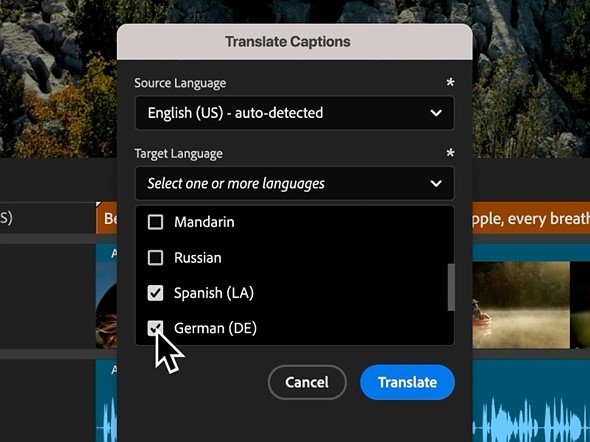
Beyond faster searches, Adobe also aims to make it faster to generate captions with this update. Adobe announced its Text-Based Editing feature in September 2023, which provided automatic transcriptions using Adobe Sensei. Now, the company is expanding functionality to translate those transcripts and generate captions in multiple languages. Premiere Pro beta will offer automatic translations in 17 different languages. You can also have multiple caption tracks visible simultaneously to display multiple languages.
Faster playback and more HDR support in After Effects beta
After Effects users also get two updates (in the beta app), the most significant of which allows for faster playback due to what Adobe describes as a “more modern caching system that uses both your computer’s RAM and high-performance attached hard disks.” It says that this means you won’t be limited by the amount of RAM on your computer, making it feasible for older computers to play back entire compositions for the first time. There should be no need to pause for caching or rendering since once it is cached, you can simply press play and watch.
Adobe is also bringing HDR monitoring to After Effects beta. Promising that it will be “as easy to work in HDR as it is to work in SDR with the latest version of After Effects beta.”
Press release:
Adobe introduces major new updates in Premiere Pro (beta), After Effects (beta), & Frame.io ahead of 2025 Sundance Film Festival
For filmmakers, “hurry up and wait” has always been part of the movie-making process, and nobody knows that better than the filmmakers heading to Park City for the 2025 Sundance Film Festival. Crafting the perfect story takes time. Tedious tasks like holding for sound, chasing the golden hour, or watching a status bar crawl across the screen make it harder to see the big picture and have creative breakthroughs.
We’ve been working hard to reduce tedium for video professionals, which means you’ll spend less time hunting for the perfect clip, transcribing and translating footage, waiting for motion graphics to playback, or troubleshooting color pipelines. Leaving you more time to do the things you love.
Today we’re excited to introduce new features in Premiere Pro (beta), After Effects (beta), & Frame.io that will make editors and motion designers faster than ever.
Find footage faster with AI-powered Media Intelligence and the new Search panel in Premiere Pro (beta)
For editors, finding the perfect shot is hard. Every editor has their own delicate, fastidious system for reviewing, logging, and finding their favorite moments as they piece together their timeline. But if you’re like me, you’ve also had this experience: you’ve finished your edit, handed it off – then found the one magical shot you should have used after everyone starts watching it. It’s the worst.
With new Media Intelligence and the Search panel in Premiere Pro (beta), the power of AI helps you find exactly what you need, when you need it. The content of your clips is automatically recognized, including objects, locations, camera angles, and more. With the new Search panel, you can use natural language to find visuals, spoken words, or content with embedded metadata like shoot date or camera type – all at the same time.
That means you can search footage for descriptive terms like “person skating with a lens flare” or “close up of person running at sunset” and see relevant moments I can quickly scrub through or load in the Source monitor. Or I can search for “California” and find related visuals, transcript mentions, and embedded metadata with shoot location all in one place!
Plus, media analysis is super-fast and happens entirely on your own system, so you don’t need an internet connection to use it. And as with all our AI-powered tools, your content is never used to train any AI models.
Go global in seconds with Caption Translation in Premiere Pro (beta)
Since we launched our popular Text-Based Editing workflow, we’ve had fantastic feature requests like bulk removal of pauses and filler word detection. Now that we’ve added those, we’re working on the next most popular request: caption translation!
Captions have become increasingly critical for accessibility and engagement on social media. Now you can more easily expand your global audience with fast, accurate translations in 17 languages. Plus, you can have multiple caption tracks visible at the same time to display various languages, or even assist you through editing in a different language.
Fast, seamless playback in After Effects (beta)
Everyone wants to work faster and save time. After Effects (beta) is rising to meet that demand with new performance improvements that let you preview more of your comp than ever before.
We’re introducing a faster, more modern caching system that uses both your computer’s RAM and high-performance attached hard disks to preview and playback larger and more complex projects faster than ever before. It makes motion design more interactive, responsive, and fun.
You’re no longer limited by the amount of RAM on your computer when you play back your work. That means even older desktops and laptops can now play back entire compositions in After Effects for the first time, without having to pause for caching or rendering. As soon as a comp is cached, press play, and spend more time watching creative work with less time spent waiting.
Go end to end in HDR in After Effects (beta)
Additionally, we’re bringing HDR monitoring to After Effects (beta). With support for PQ and HLG video, motion designers can now view their HDR comps accurately with improved video scopes that support HDR. Whether you’re working on a laptop or using professional I/O hardware to send an HDR signal to a calibrated reference monitor, it’s just as easy to work in HDR as it is to work in SDR with the latest version of After Effects (beta).
Frame.io Camera to Cloud: Now available for select Canon cameras
We’ve partnered with Canon to deliver an exciting new integration between Frame.io Camera to Cloud (C2C) and Canon’s C80 and C400 cameras. With a recent firmware update in December, you can now automatically upload proxy files directly from your Canon camera to Frame.io, giving your post-production teams and creative stakeholders access to footage from anywhere within moments of image capture. And since Premiere Pro supports raw camera formats from these cameras, this integration allows teams to get the best of both worlds: speed and quality. Send proxy files to the cloud quickly to start an edit and relink to the camera originals before your final delivery.
This seamless connection between production and post-production enables a whole new way to collaborate in real-time that unlocks faster project turnarounds and the ability to address potential issues before production wraps. By addressing problems as they occur, you can avoid costly reshoots and have greater confidence that everything you’ve captured is securely stored and accessible regardless of location.
With just a Frame.io account, a Canon C80 or C400, a network connection, and a simple six-digit pairing code, you can get started uploading your video files to the cloud within minutes. Whether you’re working on an independent project, or a large-scale production, this integration offers a streamlined, more efficient workflow from capture to edit.
Everything you need, for everything you’ll make.
No matter your workflow, genre, content, or delivery platform, we’re focused on making tools that reduce the tedium so you can focus on what you love: telling your story. And as more professional editors and motion designers than ever choose Premiere Pro, After Effects, and Frame.io, we’re continuing to prioritize core workflows so you can tell your story with powerful industry standard tools.
Many of our Video Team members – product managers, engineers, marketers, and designers – are also editors, motion designers, and filmmakers who are passionate about delivering features that solve everyday pain points. We worked through iterating designs, testing ideas, and incorporating feedback based on real world use cases over months of development, and we’re excited these features are available for you to use today.
We encourage you to try these new features in beta and give us your feedback! If you’re a Creative Cloud member, you have access to beta apps. You can even install the betas side-by-side with the current releases of Premiere Pro and After Effects.
Availability
All these features are available now in beta. For more information on how to access the beta apps, please visit the Premiere Pro (beta) page.

Our DPREVIEW Tribute:
After nearly 25 years of operation, DPReview closed on 10 April 2023. This difficult decision was part of the annual operating plan review that parent company, Amazon, shared earlier this year.
Over the course of 25 years, DP Review built up a reputation as being one of the most informative places to go for information about that new camera or lens you’re after. DP Review began as an independent reviews site based in the UK in 1998, the brainchild of Philip and Joanna Askey, but it was eventually purchased by Amazon in 2007 and relocated over to Seattle in the USA in 2010.
Cheers DPReview – thanks for the great work and content that guided photographers, videographers and techno junkies the world over!